
Audit-Ready SDS Management System: A Complete Guide for 2026
Summary
An audit-ready SDS management system keeps Safety Data Sheets current, searchable, and instantly accessible while preserving version history, audit trails, and compliance records. In 2026, that means using centralized digital controls, automated updates, and real-time reporting to reduce inspection risk and support continuous compliance.
Introduction
EHS audits have become more rigorous in 2026 because regulators, customers, insurers, and internal governance teams expect faster proof of compliance, better documentation discipline, and clearer evidence that hazards are controlled. For chemical programs, the most common findings still revolve around missing SDSs, outdated revisions, poor accessibility, and weak document control, which is why audit preparedness must be built into daily operations rather than treated as a pre-inspection scramble.
A strong SDS management system does more than store files. It creates a live compliance environment where every hazardous chemical is linked to a current SDS, employee access is immediate, records are traceable, and managers can prove that the library is being maintained continuously.
The basics of audit-ready SDS management system
The audit-ready SDS management system guarantees that all safety data sheets are always up-to-date, easily searchable, and accessible while providing complete document history, audit trail, and compliance records. For 2026, the cloud-based SDS software equipped with auto-updating, version control, user roles, and reporting capabilities will make life easier for companies during OSHA inspections.
What is it?
The audit-ready SDS management system represents a process and a tool that enables effective management of chemical safety data in order to be ready for inspections, training, and operational activities. It guarantees that the correct SDS is found and used and all previous versions are kept.
Its purpose is compliance and risk control, not just file storage. A document repository can hold PDFs, but an audit-ready system connects documents to chemical inventories, tracks edits, records user actions, and proves that employees had immediate access during the work shift.
That difference matters because auditors do not usually ask whether an SDS exists somewhere. They ask whether the SDS is current, whether employees can access it without barriers, and whether the organization can demonstrate control over the full lifecycle of the document.
Why does audit readiness matter?
It is important to be audit-ready because the impact of inadequate SDS management goes beyond receiving citations. Failing an SDS audit will lead to issues found during OSHA inspection, ISO 45001 audits, customer audits, insurance audits, and environmental assessments, particularly where there is insufficient or conflicting chemical information.
In OSHA inspections, SDS availability is a core expectation under the Hazard Communication Standard, and employers must keep SDSs readily accessible during each work shift in each work area without barriers to immediate access. Internal audits use the same logic: if a site cannot quickly prove that every hazardous chemical is documented and available, the chemical program is not truly controlled.
Audit readiness also lowers legal and financial exposure. When records are centralized, access is documented, and document versions are controlled; organizations reduce the chance of conflicting information, missing hazardous substance data, and delays during incident response or regulator requests.
Applicable rules
1. OSHA Hazard communication standard
OSHA’s Hazard Communication Standard requires chemical manufacturers and importers to prepare labels and SDSs, and it requires employers to maintain SDSs for hazardous chemicals in the workplace and make them readily accessible to employees. The standard also specifies a uniform 16-section SDS format, which helps auditors and employees locate hazard, first-aid, handling, and exposure information consistently.
Electronic access is allowed if it does not create barriers to immediate employee access. In practice, that means workers should not have to search outside the work area, wait for permission, or rely on a system that is unavailable during an emergency.
2. GHS requirements
The Globally Harmonized System supports standardized classification and communication of chemical hazards, including consistent SDS structure and labeling practices. For audit readiness, that standardization matters because it reduces ambiguity in hazard communication across sites, suppliers, and languages.
GHS-aligned SDSs help organizations compare chemicals more easily and make sure the document library is organized in a way that supports searches, reviews, and training. In a multi-site environment, that consistency is often what separates a defensible program from a confusing file archive.
3. EPA chemical rules
EPA chemical regulations do not replace OSHA’s SDS requirements, but they often intersect with chemical management, waste handling, spill response, and environmental reporting. For facilities that store, use, or dispose of regulated chemicals, having the correct SDS on hand helps support environmental compliance decisions and emergency planning.
In practice, an audit-ready SDS system improves downstream environmental review because it ties the chemical identity to hazard, handling, and emergency information. That makes it easier to validate inventories, evaluate storage practices, and support incident documentation.
4. Right-to-know laws
Workplace right-to-know laws at the state level often reinforce the same basic principle: employees must be able to obtain hazard information quickly and reliably. These rules commonly emphasize access, training, and the availability of accurate hazard records.
The compliance lesson is simple. If employees cannot find the SDS at the point of use, the organization is not meeting the intent of right-to-know requirements, even if the file exists somewhere in the system.
5. Industry rules
Certain industries impose stricter expectations because of the chemicals involved, the scale of operations, or the likelihood of multi-site audits. Healthcare, pharmaceuticals, oil and gas, food manufacturing, construction, warehousing, and government facilities often face layered review from internal EHS teams, clients, and regulators.
In these settings, an SDS system must support role-based access, remote retrieval, contractor use, and multi-location governance. The larger and more distributed the operation, the more important central control becomes.
Why do audits fail?
Organizations usually fail SDS audits for preventable reasons, not because the regulation is unclear. The most common problems are missing SDSs, outdated versions, poor access, and weak recordkeeping discipline.
- Missing Safety Data Sheets
- Outdated SDS versions
- Employees cannot access SDSs quickly
- Paper binders with missing documents
- Duplicate SDS records
- Incomplete chemical inventory
- No document revision history
- Lack of employee training records
- Poor document organization
These issues often appear together. For example, a facility may have a binder, but if the binder lacks the newest revision, the chemical inventory is outdated, and employees do not know where to look during a shift; the system still fails the audit test.
A deeper problem is that many organizations treat SDS management as clerical work instead of compliance infrastructure. That mindset usually leads to fragmented records, inconsistent naming conventions, and no practical way to prove who saw what and when.
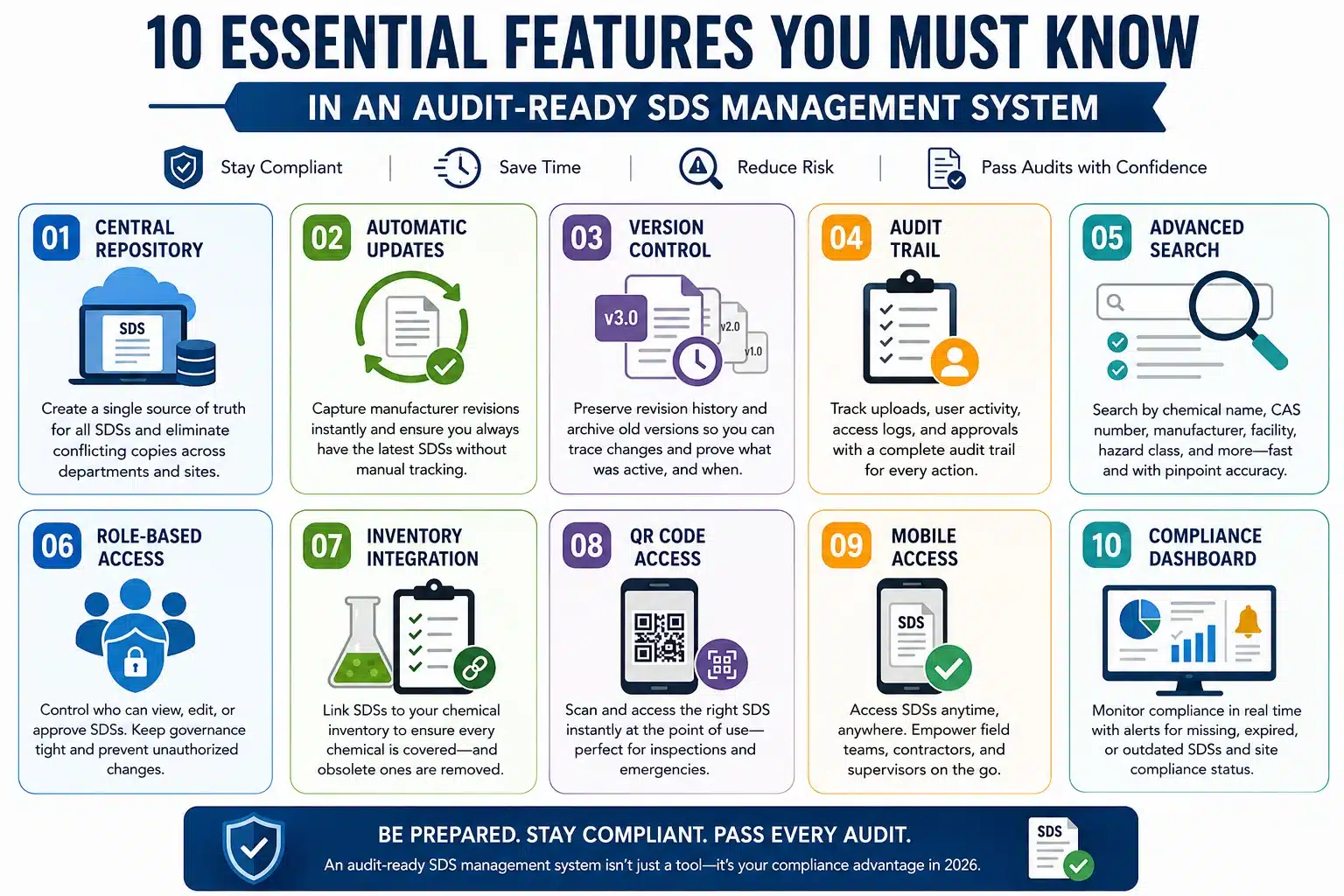
Essential features
1. Central repository
A centralized repository creates one source of truth for each SDS and prevents departments from keeping conflicting copies. When multiple versions circulate, audits become harder because nobody can easily prove which document is current. Centralization also improves response time. Instead of searching through binders, emails, and shared drives, users can retrieve the correct SDS from one controlled system.
2. Automatic updates
Automatic SDS updates reduce manual monitoring and help ensure that manufacturer revisions are captured quickly. That matters because chemical suppliers may revise hazard classifications, precautionary statements, or emergency details over time. From a compliance perspective, automation reduces the chance that an old revision remains in use after a supplier update. From an operational perspective, it saves EHS staff from repeatedly chasing documents across facilities.
3. Version control
Version control preserves revision history, archives prior copies, and makes changes traceable. This is critical in audits because reviewers may ask whether the site can prove when a document changed and what version was active at a given time. Good version control also helps with incident analysis. If a spill, exposure, or storage issue occurred, the organization can review the exact SDS version that was in force at the time.
4. Audit trail
A complete audit trail shows upload history, user activity, document access logs, and approval records. That record can be invaluable when an auditor asks how the organization knows a document was reviewed or accessed. Audit trails also support internal accountability. If a site manager updates inventory data or approves a document, the system should preserve that action for later review.
5. Advanced search
Advanced search is one of the most practical features in audit-ready SDS software. Users should be able to search by chemical name, product name, CAS number, manufacturer, department, facility, or hazard class. Fast search is not only convenient; it is a compliance advantage. During inspections or emergencies, seconds matter, and a robust search function reduces the chance of delays, confusion, or incomplete retrieval.
6. Role-based access
Role-based access lets corporate EHS, site managers, employees, contractors, and auditors see only what they need while keeping governance tight. This helps control document editing, approval workflows, and sensitive administrative actions. It also reduces accidental changes. A clear access model prevents unnecessary edits and helps maintain consistent document control across the enterprise.
7. Inventory integration
Chemical inventory integration links SDSs to actual chemical use on site. That connection improves audit accuracy because the system can show whether every listed chemical has a corresponding SDS and whether obsolete chemicals have been removed. This linkage is especially useful in multi-site organizations, where inventory drift can quietly create compliance gaps. When inventory and SDS records are synced, audits become far more defensible.
8. QR code access
QR code access supports faster inspections, emergency response, and mobile retrieval. Employees can scan a code at the point of use and jump directly to the correct SDS on a phone or tablet. That feature is especially valuable in large facilities, warehouses, and field environments. It reduces the dependence on memory and manual searching under pressure.
9. Mobile access
Mobile accessibility is important for remote workers, field technicians, and operations spread across multiple locations. If people cannot reach SDSs in the field, the system is not truly immediate. Mobile access also helps supervisors and contractors who move between areas. In practice, this improves both usability and compliance because the information follows the worker instead of staying fixed in one office.
10. Compliance dashboard
A compliance dashboard gives managers visible indicators such as missing SDS reports, expired SDS alerts, facility compliance status, and chemical inventory reports. These metrics help teams prioritize corrective actions before the next audit. Dashboards are useful because they turn a static document library into an active management tool. Instead of waiting for a finding, teams can see risk patterns early and respond quickly.
Audit checklist
☑ Use this practical checklist to evaluate your SDS program:
☑ Every hazardous chemical has an SDS
☑ Current SDS versions are available
☑ Employees have immediate access
☑ The chemical inventory matches the SDS library
☑ Duplicate records are removed
☑ Archived SDSs are retained appropriately
☑ Training is completed and documented
☑ Audit logs are available
☑ Emergency contacts are updated
☑ Regular compliance reviews are performed
A checklist like this works best when it is part of a recurring review cycle. If you only use it during inspection season, the organization will remain reactive instead of controlled.
The value of CloudSDS
Cloud-based SDS platforms help organizations stay audit-ready by automating many of the tasks that traditionally create gaps. They can centralize records, preserve version history, log access, support search, and keep the library aligned with the chemical inventory. In practical terms, CloudSDS-style systems reduce the chance of human error by turning compliance into a managed workflow. That includes automated SDS updates, centralized cloud storage, complete audit logs, AI-powered search, facility and department tagging, inventory integration, QR code access, mobile access, role permissions, enterprise reporting, and multi-site governance. The strongest value is continuity. Instead of doing a big cleanup before an audit, the organization can show that controls were in place all year long.
Paper vs digital
| Feature | Paper-Based System | CloudSDS |
| Document Search | Slow | Instant |
| Version Control | Manual | Automatic |
| Audit Trail | Limited | Complete |
| Compliance Reports | Manual | Real-Time |
| Employee Access | Limited | Anywhere |
| Multi-Site Support | Difficult | Centralized |
| Audit Readiness | Reactive | Continuous |
A digital system is not automatically compliant, but it is much easier to govern when the platform is designed for access, versioning, and reporting. The table above shows why paper-based programs struggle as organizations scale, and inspections become more data-driven.
OSHA audit prep
Preparing for an OSHA SDS audit should follow a sequence, not a scramble. The basic workflow is to review the inventory, confirm current SDSs, remove obsolete records, validate access, and test the system before the inspector arrives.
- Review the chemical inventory
- Verify every chemical has a current SDS
- Remove obsolete documents
- Update revised SDSs
- Confirm employee accessibility
- Review training records
- Validate emergency procedures
- Generate compliance reports
- Conduct an internal mock audit
- Correct identified gaps
The most important step is to test access as a worker would use it, not as an administrator would view it. A system can look organized in the back end and still fail if employees cannot reach it quickly in the work area.
Best practices
Strong SDS programs rely on repeatable discipline, not isolated cleanup projects. The following practices are the most effective for maintaining audit readiness:
- Centralize all SDS records
- Enable automated document updates
- Schedule periodic SDS reviews
- Standardize document naming
- Assign compliance responsibilities
- Use role-based permissions
- Integrate chemical inventory
- Conduct quarterly internal audits
- Train employees regularly
- Maintain complete audit logs
These practices work because they reduce drift. Over time, drift is what causes compliance failures: a supplier revision is missed, a document is renamed inconsistently, a contractor cannot find a file, or a site forgets to remove an obsolete chemical.
Common mistakes
The most common mistakes are behavioral as much as technical. Many organizations wait until an inspection is scheduled, keep outdated binders, or assume that old records are still sufficient.
- Waiting until an inspection is scheduled
- Keeping outdated paper binders
- Missing supplier updates
- Storing multiple versions without tracking is a problem
- Poor facility organization
- No employee training verification
- Missing contractor access
- No disaster recovery plan
These mistakes are easy to make when SDS management is decentralized. They become much harder to avoid when the organization uses one controlled platform and assigns clear ownership for review, updates, and reporting.
Industries that benefit
1. Chemical manufacturing
Chemical manufacturing needs robust SDS governance because product lines change, hazard classifications evolve, and customers expect precise documentation. Audit-ready systems also support downstream distribution and regulatory communication.
2. Healthcare
Healthcare organizations employ a diverse array of cleaners, disinfectants, lab reagents, and maintenance chemicals. Access to SDS is important for healthcare workers, housekeeping, and emergency teams.
3. Pharmaceutical
A typical pharmaceutical company usually handles restricted materials and lab procedures, with document management being an integral part of the quality system. Proper handling of SDS is required in both safety and documentation respects.
4. Oil and gas
Oil and gas companies work in remote areas where access, movement, and immediate retrieval are crucial. In such conditions, the importance of mobile SDS access becomes evident.
5. Food manufacturing
Food processing plants require proper documentation of sanitizers, lubricants, refrigerants, and other maintenance chemicals.
6. Construction
Construction projects involve constantly changing people, contractors, and locations. Mobile capabilities and QR codes make it possible to sustain SDS availability on-site.
7. Warehousing & Logistics
Warehouses and logistics centers require storing various materials like aerosols, cleaning solutions, batteries, fuels, and maintenance chemicals. The centralized SDS solution helps maintain consistency between different shifts and facilities.
8. Education
Colleges, schools, and research institutions require SDSs for their science labs, maintenance departments, housekeeping activities, and research labs. A system that is audit ready will be convenient for managing staff access and document retention.
9. Government
Governments and other state bodies may have many layers of control, public transparency, and multiple building requirements. This type of SDS system will make the governance easier.
Future in 2026
SDS management that's ready for audit purposes in 2026 will have more automation and will be more data-driven. AI compliance monitoring will detect any loopholes, highlight missing documentation, and also forecast which audit will reveal potential problems.
Predictive audit alerts and automated regulatory updates will still save time, whereas API connections with EHS and ERP platforms will enhance the process of inventory matching. Enterprise-level analytics will assist in making compliance trends visible to executives.
A major shift is the move toward machine-readable SDS metadata. When systems can interpret chemical data more intelligently, searches, alerts, and reporting become faster and more reliable.
FAQs
What is an audit-ready SDS management system?
It is a controlled SDS program that ensures updating, accessibility, versioning, searching, and tracking of documents for auditing and emergencies.
How do firms get prepared for OSHA's SDS audit?
They audit their chemical inventory, make sure their SDSs are current, assess the accessibility of SDSs, and conduct an internal mock audit.
Which documents do OSHA inspectors examine?
Typically, OSHA inspectors examine SDSs, labels, SDS accessibility, training records, and documentation that the chemical inventory is controlled.
Is electronic management of SDSs required by OSHA?
No, electronic management of SDSs is not required by OSHA.
How often should SDS libraries be audited?
Best practice is at least quarterly internal reviews, with ongoing checks whenever the inventory, supplier data, or regulations change.
What is an SDS audit trail?
This is the history of uploads, changes, accesses, approvals, and user activities for tracking how SDS documents were managed.
How does version control enhance audit readiness?
Version control demonstrates what SDS was live, retains past versions, and aids in proving document management during an audit.
Key Takeaways
The process of being audit-ready is something that does not happen once but is a continuous process. SDS management that is centralized and based on cloud reduces non-compliance issues, increases document accuracy, and makes it easy for employees to get documents when needed. The version control, audit trail, automatic updates, and reporting reduce audit findings. Internal audits and training of the staff make OSHA compliant.
References
- Occupational Safety and Health Administration, Hazard Communication Standard, 29 CFR 1910.1200. https://www.osha.gov/sites/default/files/publications/OSHA3493QUICKCARDSAFETYDATASHEET.pdf
- OSHA Hazard Communication overview and SDS guidance. https://www.osha.gov/hazcom
- OSHA Federal Register notice on the 2026 HazCom compliance date extension.
- NIOSH workplace safety resources. https://www.cdc.gov/niosh/index.html
- United Nations Globally Harmonized System materials. https://unece.org/DAM/trans/danger/publi/ghs/ghs_rev02/English/08e_annex4.pdf
- ISO 45001 documented information guidance. https://isomanaged.com/knowledge-base/iso-standards/iso-45001/iso-45001-clause-7-5-documented-information

Simplify Your SDS Management
CloudSDS gives your team instant access to 23M+ safety data sheets with AI-powered search, automated updates, and full OSHA/GHS compliance — all from one platform.
Leave A Comment