

Multi-Location SDS Management Strategies in 2026
Summary
Multi-location SDS management is no longer just about keeping a binder on a shelf; it is about maintaining one governed chemical information system that supports every facility, every shift, and every user’s role. In 2026, the strongest programs combine centralized cloud control, site-level access, automated version updates, QR codes, and reporting that proves readiness across the enterprise.
Introduction
As organizations expand into multiple plants, warehouses, labs, campuses, job sites, and remote operations, SDS management becomes harder because each location can have different chemicals, different users, and different access needs. That complexity creates real risks: inconsistent SDS versions, duplicate records, limited employee access, and audit failures when a site cannot produce the right document quickly.
A cloud-based SDS platform helps solve those problems by standardizing the master library while still allowing location-specific access and local control. Done correctly, it helps EHS managers see what is going on in all facilities, helps employees access necessary sheets faster in case of emergency situations, and helps avoid excessive paperwork required for keeping different binders or databases in each facility.
The multi-location approach to SDS management is keeping one central database of updated SDSs but providing access to location-specific sheets by employees. The best strategy for 2026 is to use cloud SDS software with automatic version management, role-based permissions, facility tags, QR code access, and central reporting.
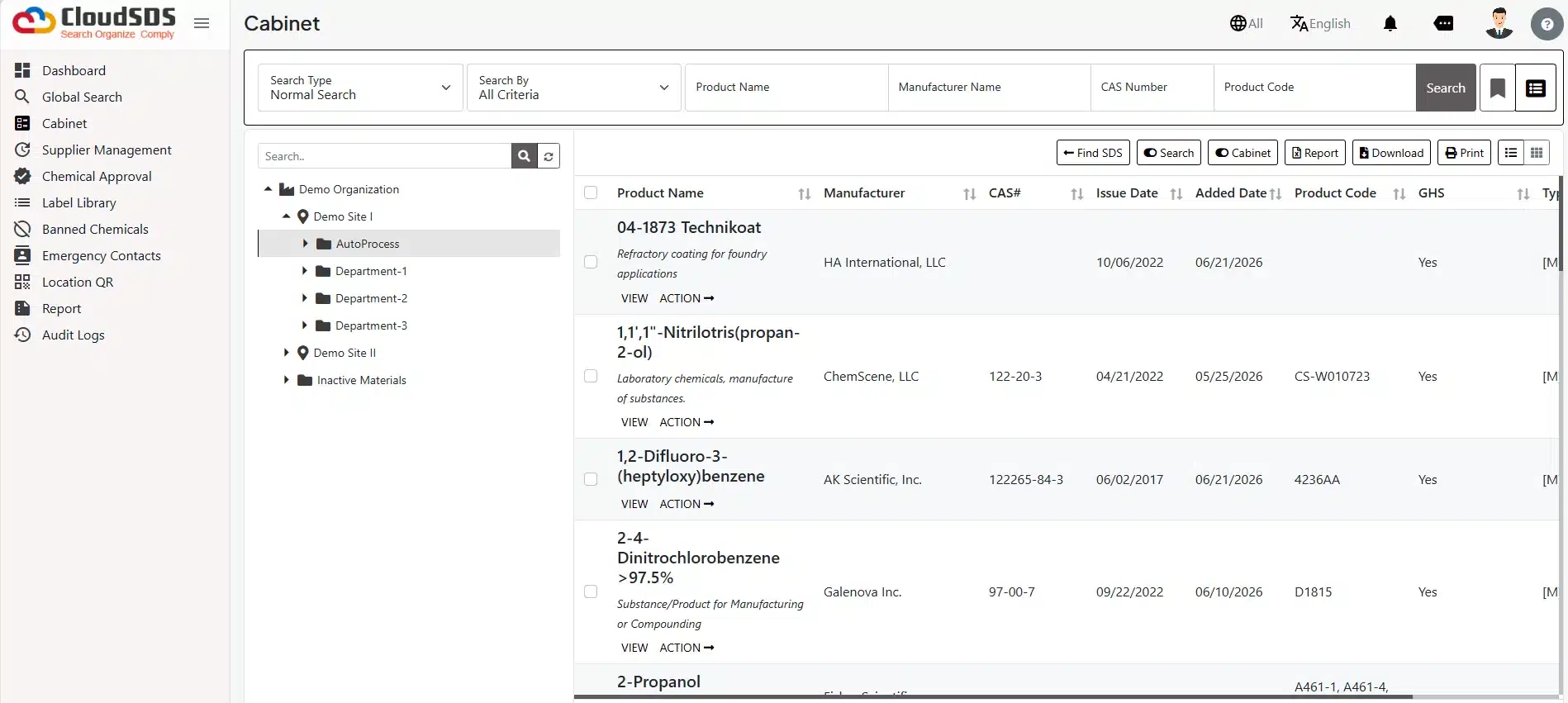
What is the multi-location of SDS management?
Multi-site management of Safety Data Sheets refers to the management of SDS documents through a coordinated system for multiple sites, which involves the organization, updating, distribution, and management of SDSs in multiple facilities. The approach takes into account SDS data as a corporate resource and not in silos, as is done when managing a single facility.
The difference between single-site management and multi-site management of SDS is that whereas single-site SDS management involves the management of a single library, single administrator, and single access level, multi-site SDS management will involve several libraries, administrators, and access levels, among others.
This matters because growing organizations usually start with informal systems and then outgrow them fast. As soon as you have two or more sites, inconsistent naming conventions, duplicated SDS files, and uneven employee access can spread quickly unless the process is standardized.
Benefiting industries include manufacturing, healthcare, construction, oil and gas, logistics, universities, government organizations, food processing, and chemical manufacturing. These industries usually deal with huge inventory, turnover of workers, contractor labor, or workforces spread across locations requiring timely access to SDSs.
Why multi-site organizations need a different SDS strategy
Various facilities can utilize various chemicals, regardless of being owned by the same company. One plant will have process chemicals, another facility might use fuel and cleaning chemicals, while a third may be using reagents; therefore, the SDS library should take into account the local situation as opposed to the one-size-fits-all approach.
Regulations can also vary depending on the jurisdiction, line of business, end of use, and language. A multi-site solution has to accommodate such variations but maintain corporate consistency. Employee accessibility is another major reason. OSHA requires SDSs to be readily accessible during each work shift and in the work area, and electronic systems are allowed only if they do not create barriers to immediate access. That means the system has to work for office staff, maintenance teams, field crews, and contractors in real conditions, not just in a desktop demo.
Emergency response is also stronger when SDSs are organized by site and role. In a spill, fire, exposure, or cleanup event, employees need the exact SDS for the chemical present at that location right away, and the right system can surface that document in seconds through mobile access, QR codes, or local filtering.
Supplier consistency is another challenge because products can change manufacturers, formulations, or versions over time. When a business is dependent on local purchase and local filing, it results in having different copies of the same SDS available at different places, resulting in the use of outdated information.
Enterprise-wide visibility is what brings everything to a single platform. With centralized solutions, EHS managers get to know which sites lack SDS, which SDS is outdated, whose inventory needs updating, and what sites need to be addressed before any audit or incident.
Common challenges
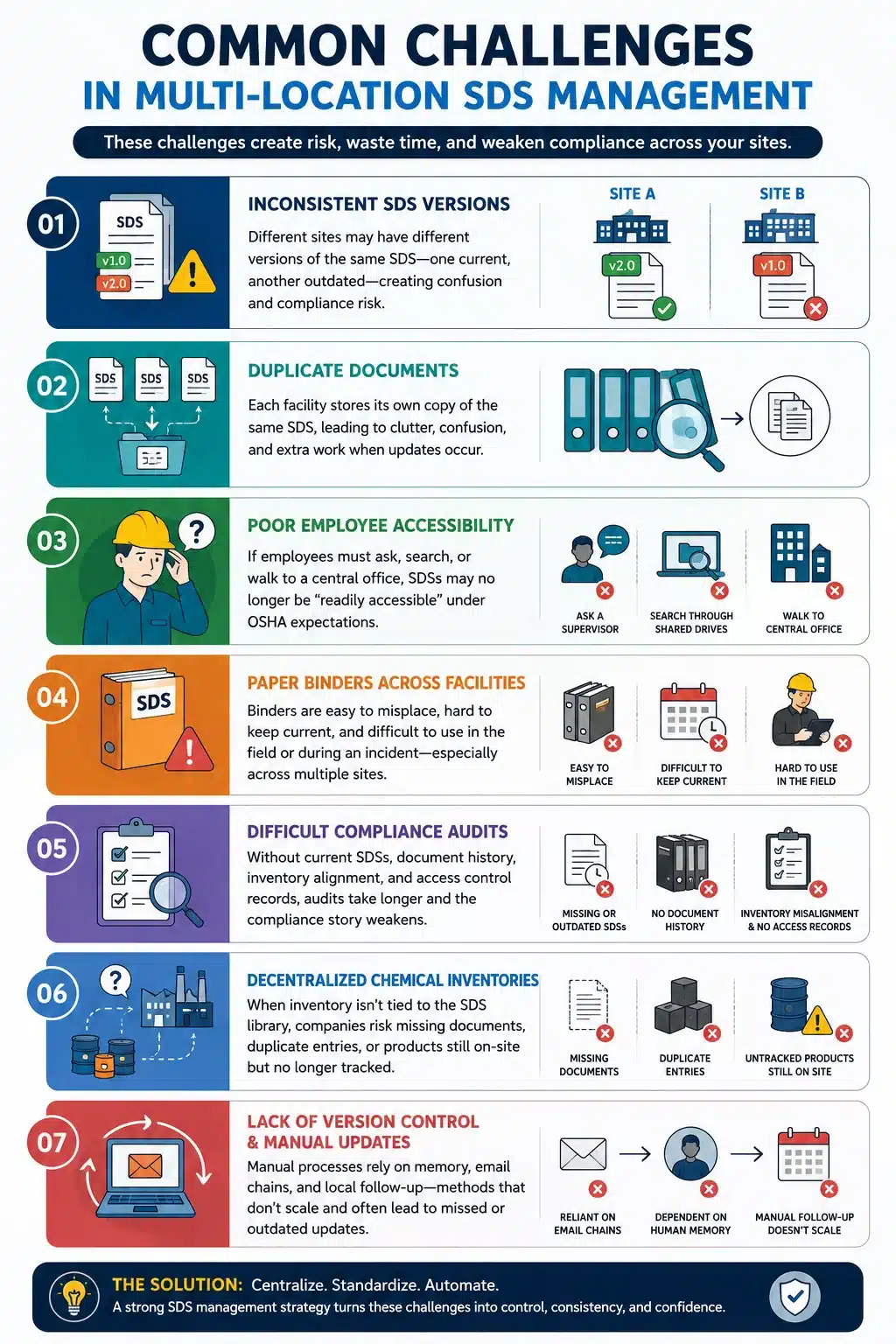
- The inconsistency between the various versions of the SDSs is among the most pressing issues within a multi-site environment. While one site might have the current version supplied by the manufacturer, another site could have an older copy.
- Duplicate documents are common when each facility downloads or stores its own copy of the same SDS. Over time, this creates clutter, confusion, and extra work when a supplier updates a document, and no one knows which copy is the current one.
- Poor employee accessibility is another frequent issue. If workers must ask a supervisor, search through shared drives, or walk to a central office to obtain an SDS, access may no longer be “readily accessible” under OSHA’s expectations.
- Paper binders across facilities also introduce risk. Binders are easy to misplace, challenging to keep current, and difficult to use in the field or during an incident, especially when employees work across multiple locations in a single shift.
- Difficult compliance audits often follow the earlier problems. If a site cannot show current SDSs, document history, inventory alignment, or access control records, the audit becomes slower and the compliance story weaker.
- Decentralized chemical inventories are another hidden issue. When the inventory is not tied to the SDS library, companies can end up missing documents, duplicate entries, or products that are still on site but no longer tracked.
- Lack of version control and manual updates are usually the root causes behind the failures above. Manual processes depend on human memory, email chains, and local follow-up, which rarely scale well across multiple facilities.
OSHA requirements
OSHA’s Hazard Communication Standard requires employers to maintain SDS copies and ensure they are readily accessible during each work shift to employees in their work area(s). OSHA guidance and interpretations indicate that “readily accessible” means immediate access, not delayed access after asking a supervisor or waiting through a long retrieval process.
Does every facility need access to SDS? In practical terms, yes—every work location where employees are exposed to hazardous chemicals must have access to the SDS information relevant to those chemicals, and employees must be able to get it without barriers. Where employees work at more than one site during a shift, OSHA-focused guidance emphasizes that they must be able to obtain information immediately in an emergency.
OSHA permits electronic SDS systems and other alternatives to paper, but only if those options do not slow access or introduce barriers. The employer remains responsible for ensuring the system works during each shift, in each work area, and under real operating conditions.
Facility-specific availability is also important. OSHA does not require a separate binder for every room, but it does require access in the actual work area, which means the employer must design the system around where employees are working, not just where records are stored.
Employer responsibilities include maintaining the SDSs, making sure employees know how to access them, and ensuring backup access procedures exist if the primary electronic system is unavailable. That is why a multi-location SDS strategy must include redundancy, training, and local implementation support.
Centralized vs decentralized SDS management
| Feature | Centralized | Decentralized |
| Version Control | Excellent | Difficult |
| Compliance | Consistent | Varies |
| Employee Access | Controlled | Inconsistent |
| Reporting | Enterprise-wide | Fragmented |
| Administration | Simplified | Time-consuming |
| Audit Readiness | High | Moderate |
Centralized management is generally better for multi-location organizations because it keeps the master data consistent while still allowing local access. Decentralized systems may feel flexible at first, but they usually create more work, more duplication, and more compliance drift as the number of sites grows.
Industries that benefit most
- Manufacturing often has the strongest need because plants use many process chemicals, cleaning agents, lubricants, and maintenance products. A centralized system helps standardize SDS access across production lines, maintenance shops, and storage areas.
- Hospitals, clinics, laboratories, and their support staff use various chemicals and cleaners. It is not only an issue of availability but also one of speed and accuracy in case of an emergency.
- Construction businesses will require mobility and offline capability because construction sites constantly change and cannot always boast of good connection. QR codes and mobile SDS solutions are perfect for businesses.
- The oil and gas industry will benefit from good location tagging capabilities, contractor support, and emergency response support because oil and gas plants are usually located in remote hazardous locations where complicated operations take place.
- Logistics and warehousing businesses can benefit from central control because logistics facilities use the same cleaners, fuels, maintenance of chemicals, and spill response supplies.
- University facilities will require coordination between labs, maintenance staff, science buildings, and even satellite campuses. Complexity is provided by the presence of several departments, lots of users, and dynamic chemical inventory.
- Government agencies usually include campus facilities, field offices, and various specific operations, so enterprise governance and audit reporting become especially important.
- Food processing facilities use cleaning chemicals, sanitation products, refrigerants, and maintenance chemicals.
- Chemical manufacturing has the highest documentation intensity of all because products, intermediates, and support chemicals can change often, and version control becomes mission critical.
How CloudSDS can help
CloudSDS appears designed around the exact needs of multi-location organizations, including multiple sites, location-based hazard information, role-based configuration, mobile apps, and reporting. Its published materials also describe location-based access, version tracking, QR code use, multilingual support, and inventory-related workflows.
1. Centralized SDS management
A centralized approach to document management would mean that all facilities receive information from one managed library. Automatic updates of SDS documents will ensure that the most current version approved by the manufacturer gets into all the facilities.
2. Customized facility-level views with role-based access
A customized facility-level view would allow each facility to see only necessary information, but the corporate side would have full control. Such an approach would improve usability and reduce confusion for people working in one facility and needing chemicals relevant to it. Role-based security will help prevent any accidental abuse of the system. It will also ensure a connection between corporate governance and local operations.
3. Audit-ready enterprise dashboard
An enterprise dashboard would display missing documents, outdated documents, and pending tasks across the enterprise. Such information would be valuable when preparing for inspections and internal audit processes.
4. Education value program structure
From an educational standpoint, the value of a platform like this is not that it replaces EHS judgment but that it gives the program structure. A centralized repository, site tagging, and automated updates are the kinds of features that help reduce duplication and support faster access across facilities.
5. Inventory integration
The integration of chemical inventories and documentation readiness are particularly valuable features for enterprises since they prevent an SDS library from turning into mere documentation storage.
6. Emergency support in multiple languages
CloudSDS also highlights user-role controls, older version access, emergency response information, and multi-site communication, which are all relevant to a mature enterprise SDS program. This is because such capabilities are directly correlated with the needs of multi-site companies that have to remain well-organized and audit-ready. In companies with a diversified workforce or operating across borders, it is crucial to have multilingual support that can enhance usability when combined with translation processes and awareness of jurisdictions.
Common mistakes
- The first error that many people make is using different SDS databases for each location. This sounds simple at the beginning, but in most cases, it leads to duplication and inconsistency.
- The other error is relying on outdated binders. Paper can be useful as a backup in some environments, but it is rarely strong enough as the primary system for a multi-site enterprise.
- Failing to update revised SDSs is a major risk because the hazard information may no longer match the current product. Without automated tracking, changes can be missed for weeks or months.
- No facility ownership is another problem. If no one is responsible for each site’s inventory, local users may assume corporate will handle it, while corporate assumes the site is doing it.
- Duplicate chemical records create confusion and inflate administrative work. The same product may appear multiple times under different names, supplier labels, or local formats.
- Missing contractor access is also a common gap. Contractors often work in high-risk areas and need fast SDS access, yet they are frequently left out of internal permission schemes.
- Inconsistent naming conventions make searching difficult and undermine the value of a centralized system. A clean naming standard is one of the simplest ways to improve search and reporting.
- No disaster recovery plan is a serious weakness because cloud systems, local devices, and network paths can all fail. A strong multi-location SDS program should define what happens if the primary system is unavailable.
Implementation steps for CloudSDS
1. Start by auditing existing SDS libraries
Identify where documents are stored, which sites use them, where duplicates exist, and which files are outdated or missing.
2. Consolidate duplicates and create a master database
The next step involves consolidating duplicate SDSs and creating the master database. It is precisely at this stage that naming conventions, supplier matching, and product standardization become crucial.
3. Structure the database by facility and department
Create the database according to facilities and departments in order to ensure a quick search for the needed document. It is important to reflect the organizational structure accurately.
4. Define user roles and permissions early
Set the user roles and permissions during the process and not when the solution is already live. Otherwise, one will have to cope with access problems.
5. Integrate chemical inventory data
Include information from chemical inventory databases in order to ensure that the SDS records correspond to the actual situation on site. This step becomes crucial for discovering missing sheets, inactive chemicals, and duplicates.
6. Enable mobile access and QR codes
Make sure that mobile access to the documents and QR codes are available. This feature is vital for the practical application of the system.
7. Schedule automated SDS updates
Schedule automated SDS updates, so revisions move through the system consistently. The fewer manual touchpoints you have, the less likely a site is to end up with an obsolete copy.
8. Train employees regularly
Train employees regularly so access is fast and familiar. Training should cover how to search, scan, filter by location, and use the backup method if the system is unavailable.
9. Perform periodic compliance assessments
Carry out periodic compliance assessments to ensure that the program continues to fit the organizational structure. Changes in size or acquisition of products or personnel may all open up new gaps if the process is not updated.
Future trends
- AI-driven searches for relevant SDS will become more common, enabling quick access to documents without needing the exact product name. It would prove highly useful in larger libraries and multilingual scenarios.
- Predictive compliance monitoring is becoming increasingly popular as systems develop their ability to recognize patterns such as missing documents, delayed updates, and problematic sites before the actual audit takes place.
- A digital twin for the chemical inventory would allow companies to have an up-to-date structural model of chemical storage and movements between locations.
- IoT-enabled storage areas might ultimately enable tracking of changes in the location of a cabinet, room, or container.
- The mobile-first EHS platform will soon become a norm due to the expectation from field employees and contractors that everything works via their phone or tablet.
- Automated updates of regulations will be more important due to business operating in multiple states and countries, where there are multiple requirements. The ability to automatically map these changes to relevant sites will be crucial.
- Analytics for enterprises will allow executives to track performance in compliance, training, and response readiness.
- Cross-border regulatory compliance will remain a major issue for multinational companies because SDS obligations, translations, and jurisdiction-specific practices can differ even when the chemical is the same.
Frequently asked questions
1. What is the multi-location of SDS management?
It is the centralized control of SDSs across more than one facility, with location-specific access and governance so employees can quickly find the right document.
2. Can one SDS library support multiple facilities?
Yes, and in most cases it should, as long as the system supports site tagging, permissions, and local access controls.
3. Does OSHA require SDS at every location?
OSHA requires SDSs to be readily accessible during each work shift in the work area, which means employees must be able to access them where they work.
4. How do companies manage SDS across multiple sites?
The best approach is to use one master repository, organize by location and department, automate updates, and give each site appropriate access.
5. What is the best SDS software for multi-location businesses?
The best platform is one that supports centralized control, location tagging, version history, role permissions, mobile access, QR codes, and reporting.
6. How often should SDS libraries be updated?
They should be updated whenever a manufacturer issues a new revision and reviewed routinely through periodic inventory reconciliation.
7. Can employees access SDS from mobile devices?
Yes, mobile access is a key feature for field workers, maintenance teams, contractors, and remote sites.
8. How do QR codes improve SDS accessibility?
QR codes let users scan a label or cabinet code and open the relevant SDS immediately, which is especially useful in emergencies.
9. Should each facility maintain its own SDS binder?
Not necessarily. A separate binder can create duplication and version problems, while a centralized system usually provides better consistency and control.
10. How do enterprise companies prevent duplicate SDS?
They use one master library, standard naming conventions, inventory reconciliation, and governance rules for document approval and retirement.
11. What are role-based permissions in SDS software?
They are access rules that define what each user group can view or manage, such as corporate EHS, site managers, employees, contractors, or visitors.
12. Can SDS management integrate with chemical inventory systems?
Yes, and this is one of the most effective ways to keep documentation aligned with actual site chemicals.
Key takeaways
Multi-site businesses require centralizing SDS management with access per location to facilitate fast information discovery. Cloud-based SDS management ensures elimination of redundant documents and version control for multiple locations. Tagging facilities, role-based permissions, QR codes, and mobile access facilitate compliance and enable a quick response in emergencies. Regular auditing, training of employees, and automatic updating contribute to OSHA compliance. CloudSDS reflects many of the features enterprise SDS programs need for centralized control and local visibility.
References
- Occupational Safety and Health Administration, Hazard Communication Standard, 29 CFR 1910.1200. https://www.osha.gov/sites/default/files/publications/OSHA3695.pdf
- OSHA interpretations and guidance on immediate employee access to SDSs. https://www.osha.gov/laws-regs/standardinterpretations/1999-12-07-0
- National Institute for Occupational Safety and Health. https://www.osha.gov/sites/default/files/publications/OSHA3695.pdf
- United Nations Globally Harmonized System of Classification and Labelling of Chemicals, Purple Book. https://webstore.ansi.org/standards/acc/ansiz4002004
- ANSI Z400.1-2004 Hazardous Industrial Chemicals – Material Safety Data Sheets – Preparation. https://webstore.ansi.org/standards/acc/ansiz4002004
- U.S. Environmental Protection Agency. https://webstore.ansi.org/standards/acc/ansiz4002004

Simplify Your SDS Management
CloudSDS gives your team instant access to 23M+ safety data sheets with AI-powered search, automated updates, and full OSHA/GHS compliance — all from one platform.
Leave A Comment