
Those bulky three-ring binder stacks piled in your office corner aren't merely pages of paper. They symbolize ten years of managing chemicals, complying, and possibly being liable. Many businesses still use those file systems because they believe that converting them to digital formats would be too costly. But having SDS for ten years in paper form creates an obstacle that will hinder the efficiency of your safety team and make you liable to your company. Switching from paper documents to digital formats isn't only about getting rid of those papers. It is about being able to retrieve information instantly in a way that makes your safety team work efficiently and with the correct information they need to do their job effectively.
The Ultimate Guide to Digitizing Your SDS Records Efficiently
The Imperative of Digitizing Your SDS Records
Managing chemical safety requires more than storing paper. You need a system that works in real-time. When you rely on physical binders, you often face delays, missing pages, and outdated information. Moving to a digital format solves these common headaches.
1. Compliance and Regulatory Requirements
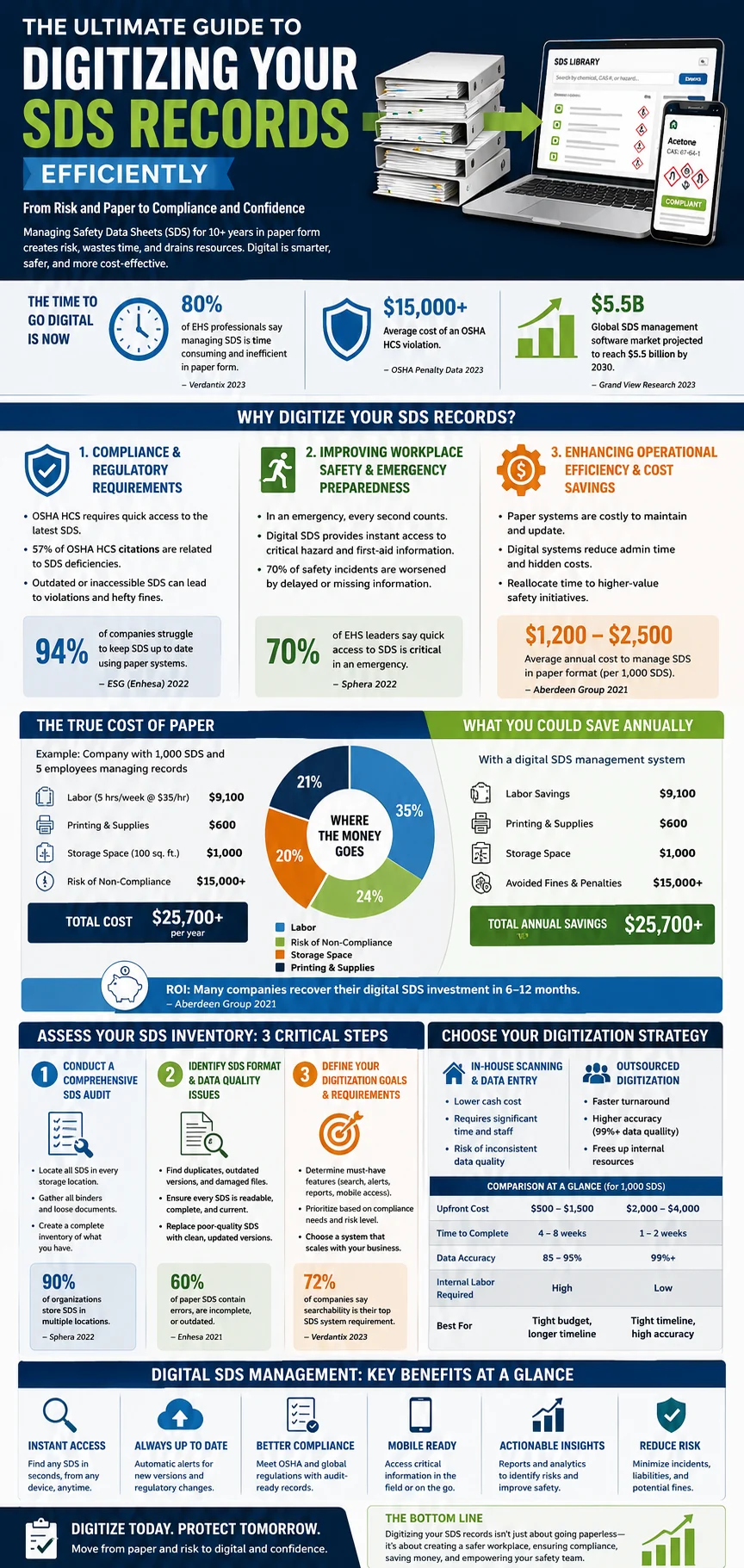
Regulations like the OSHA Hazard Communication Standard are strict about SDS access. You must provide employees with quick access to the latest chemical information. Paper binders often fail this test. If a binder is locked in an office or misplaced during a move, you are not compliant. Outdated records are another major risk. If you keep paper versions from five years ago, you might miss a safety update required by law. Violations will cost you money, and they're entirely preventable. As you digitize, you can establish alerts to update information, guaranteeing that your information is always up to date. Research what's required in your industry and determine how frequently you'll need to check and validate your inventory.
2. Improving Workplace Safety and Emergency Preparedness
Time is of essence in case of a chemical emergency. Should an employee spill out some chemicals or expose themselves to a certain dangerous substance, the information is crucial. It will be difficult for one to access such important information from a manual book. One may have to look for the tab and go through pages until one lands on that particular page with the needed data, hoping that the sheet of paper has not been misplaced. It would save the employee more time if he/she could access it using a digital system. They do not have time to look for a dusty binder in the back office. They need a system that works as fast as they do. Digital databases put critical safety information at their fingertips exactly when it matters.
3. Enhancing Operational Efficiency and Cost Savings
Paper-based records are expensive to manage. You pay for printing, paper, toner, and the physical space to store those binders. Then, you pay employees to organize, file, and update them. This administrative work adds up to significant labor costs every year. Calculate the time your team spends managing these files. If you have five employees each spending one hour a month on SDS management, that is 60 hours a year. Multiply that by your labor rate, and you will see the true cost of paper. Digital systems remove these costs. Automated updates mean you spend less time filing and more time on other important safety tasks.
Assessing Your Current SDS Inventory and Needs
Before you start scanning, you need to understand what you have. A successful digitization project starts with a clear picture of your current chemical inventory.
1. Conducting a Comprehensive SDS Audit
You likely have chemicals stored in many places. Start by creating a checklist of every area where you store chemicals or SDS binders. Check the maintenance room, the shipping dock, individual laboratory desks, and any off-site storage. You will find that some departments have their own private stashes of safety sheets. Collect every binder and folder you find. Your goal is to gather everything into one central location before you begin the digital transition. Do not worry about organizing them perfectly yet. Just get them all in one place so you know the full scope of the project.
2. Identifying SDS Format and Data Quality Issues
Once you gather the records, review them for quality. You will likely find faded text, torn pages, and multiple versions of the same chemical sheet. An effective digital system relies on good data. If the scan is blurry or the text is illegible, the digital file will be useless. Identify which files are too damaged to scan. You may need to contact the manufacturer to get a clean, updated version of these sheets. Accurate data is the foundation of safety. As one safety manager noted, "A safety data sheet is only useful if it is readable and accurate." Make sure every document you scan is complete and current.
3. Defining Your Digitization Goals and Requirements
What do you want your new system to do? You might need simple storage, or you might want advanced features. Think about how your team will use the system. Do they need to search by chemical name, CAS number, or hazard class? Prioritize these goals based on your compliance needs. If you work in a high-hazard industry, searchability by hazard class is likely your top priority. If you have a large inventory, automated alerts for expiring SDS updates will be vital. Define these requirements early so you choose the right software to match your needs.
Choosing the Right Digitization Strategy
You have a few ways to turn your paper files into digital records. Your choice depends on your budget, your staff's availability, and your timeline.
1. In-House Scanning and Data Entry vs. Outsourcing
You can do this work yourself or hire a professional service. In-house scanning costs less in cash but takes a lot of time. Your team will need to stop their regular work to scan, name, and tag thousands of pages. Outsourcing involves hiring a firm that specializes in document management. They bring the equipment, the software, and the staff to handle high-volume scanning. While this costs more upfront, it is often much faster and ensures higher accuracy. Professional services often use high-speed scanners and software that automatically indexes files, saving your team weeks of labor.
2. Selecting Appropriate Scanning Hardware and Software
If you decide to do the work in-house, invest in the right gear. A standard office printer is not enough. You need a dedicated document scanner with an automatic document feeder (ADF). This allows you to load a stack of pages and scan them in seconds. You also need Optical Character Recognition (OCR) software. OCR technology reads the text in your scanned images and converts it into searchable words. Without OCR, your digital files are just pictures of documents. With OCR, your team can type in "acetone" and find the document instantly. Look for scanners that offer at least 300 DPI resolution for the best results.
3. Exploring Cloud-Based SDS Management Systems
The best way to store your newly digitized records is in a cloud-based SDS management system. These systems offer more than just storage. They provide a centralized location that you can access from any device with an internet connection. Cloud systems often include built-in compliance features. They can automatically update your records when a manufacturer releases a new version of an SDS. This removes the manual work of checking for updates yourself. Industries like manufacturing and construction use these systems because they keep distributed workforces connected to the same, up-to-date information.
Choosing the Right Digitization Strategy
You have a few ways to turn your paper files into digital records. Your choice depends on your budget, your staff's availability, and your timeline.
1. In-House Scanning and Data Entry vs. Outsourcing
You can do this work yourself or hire a professional service. In-house scanning costs less in cash but takes a lot of time. Your team will need to stop their regular work to scan, name, and tag thousands of pages. Outsourcing involves hiring a firm that specializes in document management. They bring the equipment, the software, and the staff to handle high-volume scanning. While this costs more upfront, it is often much faster and ensures higher accuracy. Professional services often use high-speed scanners and software that automatically indexes files, saving your team weeks of labor.
2. Selecting Appropriate Scanning Hardware and Software
If you decide to do the work in-house, invest in the right gear. A standard office printer is not enough. You need a dedicated document scanner with an automatic document feeder (ADF). This allows you to load a stack of pages and scan them in seconds. You also need Optical Character Recognition (OCR) software. OCR technology reads the text in your scanned images and converts it into searchable words. Without OCR, your digital files are just pictures of documents. With OCR, your team can type in "acetone" and find the document instantly. Look for scanners that offer at least 300 DPI resolution for the best results.
3. Exploring Cloud-Based SDS Management Systems
The best way to store your newly digitized records is in a cloud-based SDS management system. These systems offer more than just storage. They provide a centralized location that you can access from any device with an internet connection. Cloud systems often include built-in compliance features. They can automatically update your records when a manufacturer releases a new version of an SDS. This removes the manual work of checking for updates yourself. Industries like manufacturing and construction use these systems because they keep distributed workforces connected to the same, up-to-date information.
Implementing and Maintaining Your Digital SDS System
Your job does not end when the files are in the cloud. You need to make the system part of your daily workflow.
1. Integrating with Existing Workflows and Systems
The goal is to make the system easy to access. Place links to your digital SDS library on your company's intranet or on the home screen of tablets used on the shop floor. If you use inventory software, see if it can integrate with your new SDS management system. The better they work together, the more secure and compliant you will be. Implement your project in phases. Begin with either one department or one location. Allow that group of people to use the system, find problems, and become familiar with how it works. Then you can proceed to the next phase. This prevents your employees from being inundated by the change.
2. Training Employees on System Usage and Access
Technology is only useful when people understand how to utilize it. Arrange some training sessions where you will teach them how to access the system, how to look for chemicals, understand safety data sheets, and how to report any errors. Remember to always inform them that this technology has been introduced for their benefit. They will become much more supportive when they understand the importance of this system. Provide them with contact details so that they can seek help if they have difficulties accessing their files.
3. Establishing a Routine for Updates and Audits
A digital system is not a "set it and forget it" tool. You must keep it updated. Establish a process for receiving new SDS from your suppliers. When a new chemical arrives, add the SDS to the system immediately. Schedule regular audits. Every six months, check your digital inventory against your physical supply. Make sure no chemical is on the floor that does not have a corresponding sheet in the system. Assign a specific person to manage these updates. When SDS management becomes a routine part of your operations, compliance becomes much easier to maintain.
Conclusion
Digitizing ten years of SDS records might seem like a large project, but the payoff is worth it. You will save time, reduce your physical clutter, and create a safer environment for your team. By following a clear, step-by-step process, you can move from paper-based stress to a modern, efficient, and compliant digital system today. Start your audit, pick your strategy, and give your business the safety foundation it deserves.

Simplify Your SDS Management
CloudSDS gives your team instant access to 23M+ safety data sheets with AI-powered search, automated updates, and full OSHA/GHS compliance — all from one platform.
Leave A Comment