
Effective chemical safety management cannot rely on guesswork for organizations that handle chemical products. That's why companies are looking for smarter ways to deal with problems like scattered SDS files, old documents, and slow access during emergencies. These challenges can lead to non-compliance, delayed response times, and increased workplace hazards, especially in environments where quick access to accurate chemical information is vital.
Chemical safety management is indeed challenging. To deal with them, CloudSDS has designed its SDS management software that comes with some useful features to streamline this complex yet unavoidable process. From organizing each document to keeping the database updated, this system is something that any organization can rely on to ensure workplace safety.
His blog is about the top 10 features of the software that each organization must get access to. To learn more about their usefulness, continue exploring this blog article.
The SDS Management Software from CloudSDS: What You Must Know
CloudSDS designed the SDS management software to address the most intricate process, known as chemical safety management. With its help, your team can handle, update, and access Safety Data Sheets (SDS). Instead of relying on scattered files or manual tracking, CloudSDS brings everything into a centralized, cloud-based platform. This platform allows organizations to instantly search, organize, and manage SDSs with ease.
With this SDS management software, users get access to a global repository of more than 21 million SDSs. Besides, it introduces the users to fast, intuitive search capabilities that allow your teams to quickly retrieve critical hazard information whenever they need it.
What makes CloudSDS particularly valuable is its ability to automate and streamline the entire SDS lifecycle. Therefore, we guarantee hassle-free updates, real-time reporting, and chemical inventory tracking. Moreover, the platform reduces manual effort while improving accuracy and safety. It also supports global operations with features like multi-language access, role-based permissions, and mobile accessibility, ensuring that the right information reaches the right people at the right time.
Top 10 features of our SDS Management Solution
1. Smart SDS search retrieval
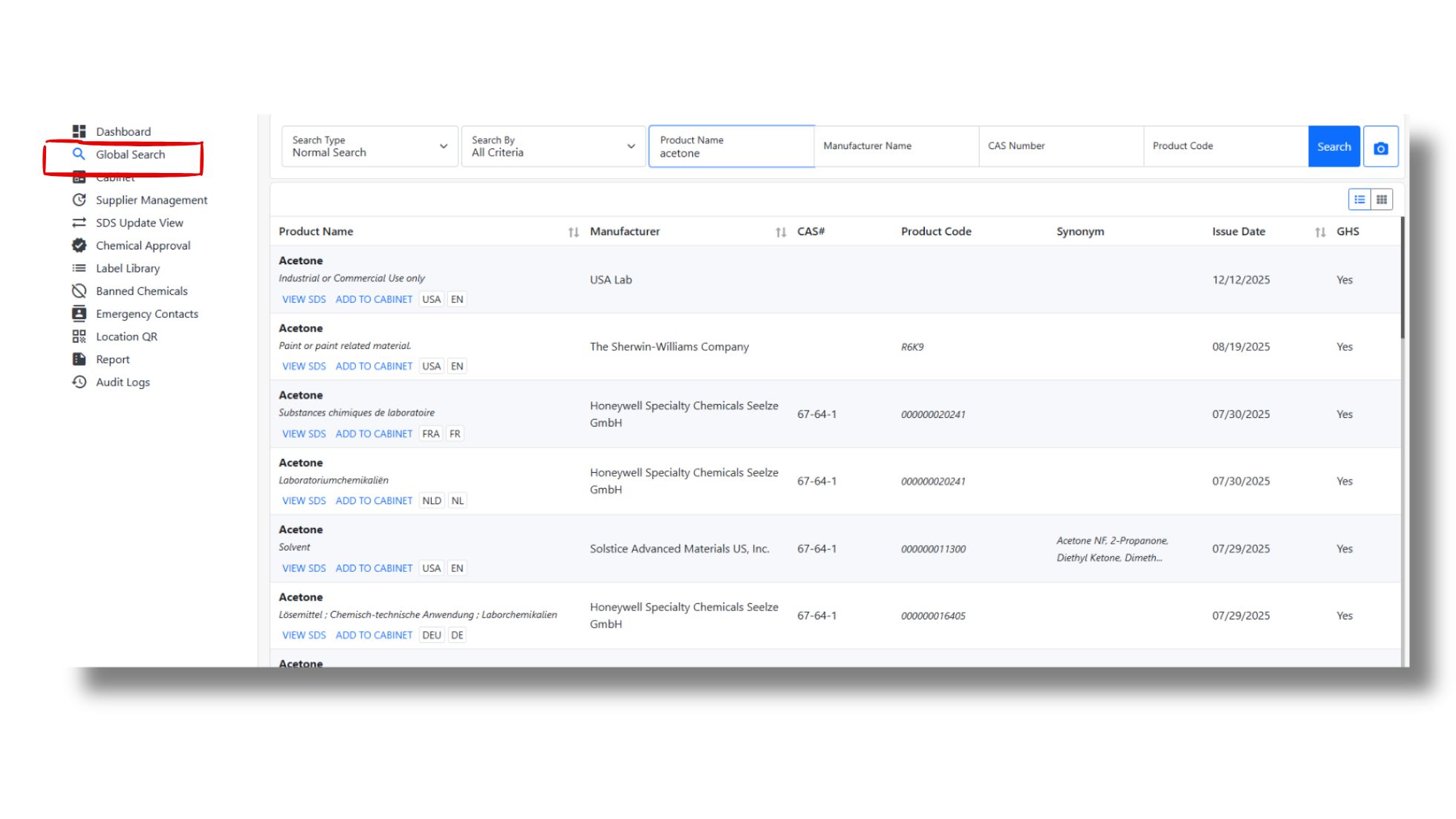
A smarter SDS search feature is a great tool to protect a workplace that handles risky chemical products. Yes, it allows all the users to quickly access the right SDS during emergencies. The retrieval process becomes easier with smart filters. As a result, it becomes easier to get access to vital information and make faster decisions. Here's how it works:
-
SDS search that is really fast
This software provides access to any required documents within a second. This quick access cuts down on wait times. Besides, this search feature comes with advanced filters that remove unnecessary search results. Thus, identifying the right document becomes easier.
-
Search by chemical name, CAS number, product name
Users can find SDSs with an advanced search by utilizing more than one identifier. The method works even if someone only knows the chemical's common name, CAS number, or product name. This makes things less confusing and faster.
-
Centralized SDS database
All SDSs are housed in one safe, central area instead of being scattered among departments or locations. This makes sure that everyone in the company is utilizing the most recent version, reduces duplication, and keeps everything the same.
-
Mobile-friendly access
Mobile compatibility lets employees access SDSs from any location and at any time. This is true whether they are working from home, in a warehouse, or on the shop floor. This flexibility is especially important during audits, inspections, or emergencies.
Why it matters:
- Ensures instant access to critical safety information during emergencies.
- Helps employees make quick and informed decisions while handling chemicals.
- Reduces the risk of accidents caused by delayed or incorrect information.
2. Automated SDS management system
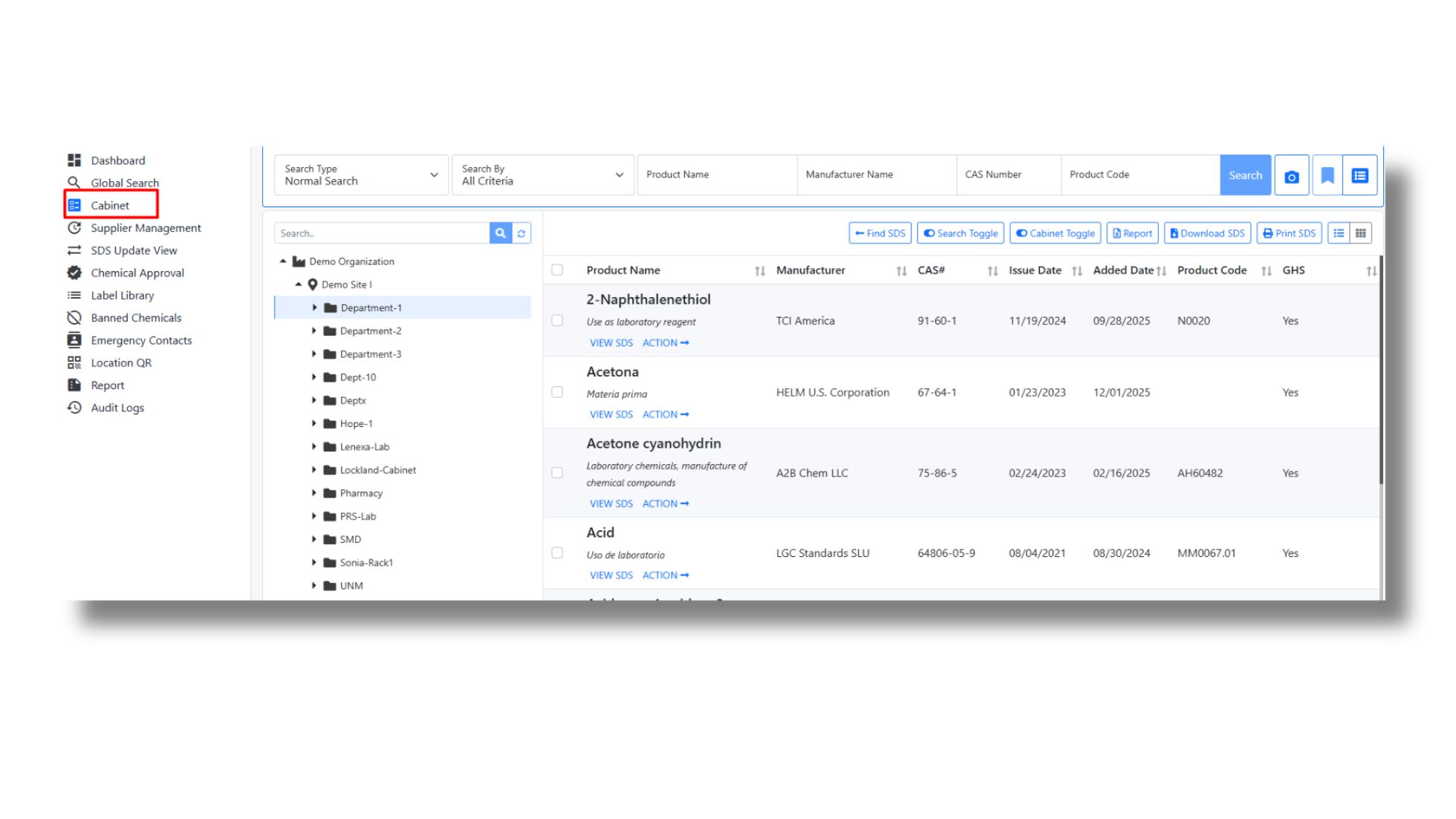
Handling SDSs manually could take a long time and be risky. The SDS management software from CloudSDS it things easier by keeping all of your SDS documents in one place and organizing, updating, and taking care of them. It helps businesses obey the law, reduce the number of mistakes, and make sure that workers always have access to the most up-to-date safety information when they need it.
-
Centralized document storage
This software keeps all of your SDSs in one cloud-based location. This means you don't have to deal with files scattered in emails, folders, or binders. Employees can get to the SDS they need right away, no matter where they are or what time it is. In short, each document remains well accessible all the time, which makes a workplace safer and more efficient.
-
Managing versions
It can be challenging to maintain track of more than one SDS version by hand. However, CloudSDS ensures that only the most recent and approved version of each SDS is present in your SDS library. It also keeps track of earlier versions, so you can see how things have changed over time and obey the rules without getting confused.
-
An updated and compliance-ready SDS library
With CloudSDS, it's easy to maintain a database that's always updated with the latest versions of SDSs. So, your team always gets access to documents that are GHS aligned. Moreover, they won't have to put in efforts to update each document separately. This guarantees that your business always has access to accurate and current safety information. This makes it less likely that you will utilize old information that could lead to safety issues or problems with obeying the rules.
Why it matters:
- Storing SDSs become more effective and organized.
- No need to delete or remove the previous SDS versions
- Get access to an SDS library, which contains authentic GHS-compliant documents.
3. GHS compliance and regulatory alignment
It might be difficult to follow worldwide safety requirements, especially when you have to deal with harmful chemicals in different parts of the world. CloudSDS is a good example of an SDS management solution that helps companies meet international standards and makes it easier to do so. It makes sure that your safety data is shared, managed, and categorized in a way that follows the standards.
-
Built for standards like the Globally Harmonized System of Classification and Labelling of Chemicals (GHS):
This software is built to follow the Globally Harmonized System (GHS), which is a set of principles for how to talk about substances and their hazards. This makes sure that all of your SDS documents use the same terms, symbols, and forms. This makes it easy for workers to understand the dangers of chemicals no matter where they are.
-
OSHA and WHMIS alignment
Various parts of the world have different safety rules. OSHA is in the US while WHMIS is in Canada, for example. This advanced SDS management software makes sure that your SDS content meets the needs of different regulatory frameworks, which helps you stay in line with them. This minimizes the risks of getting in trouble with the law or having safety issues at work.
-
Labeling support
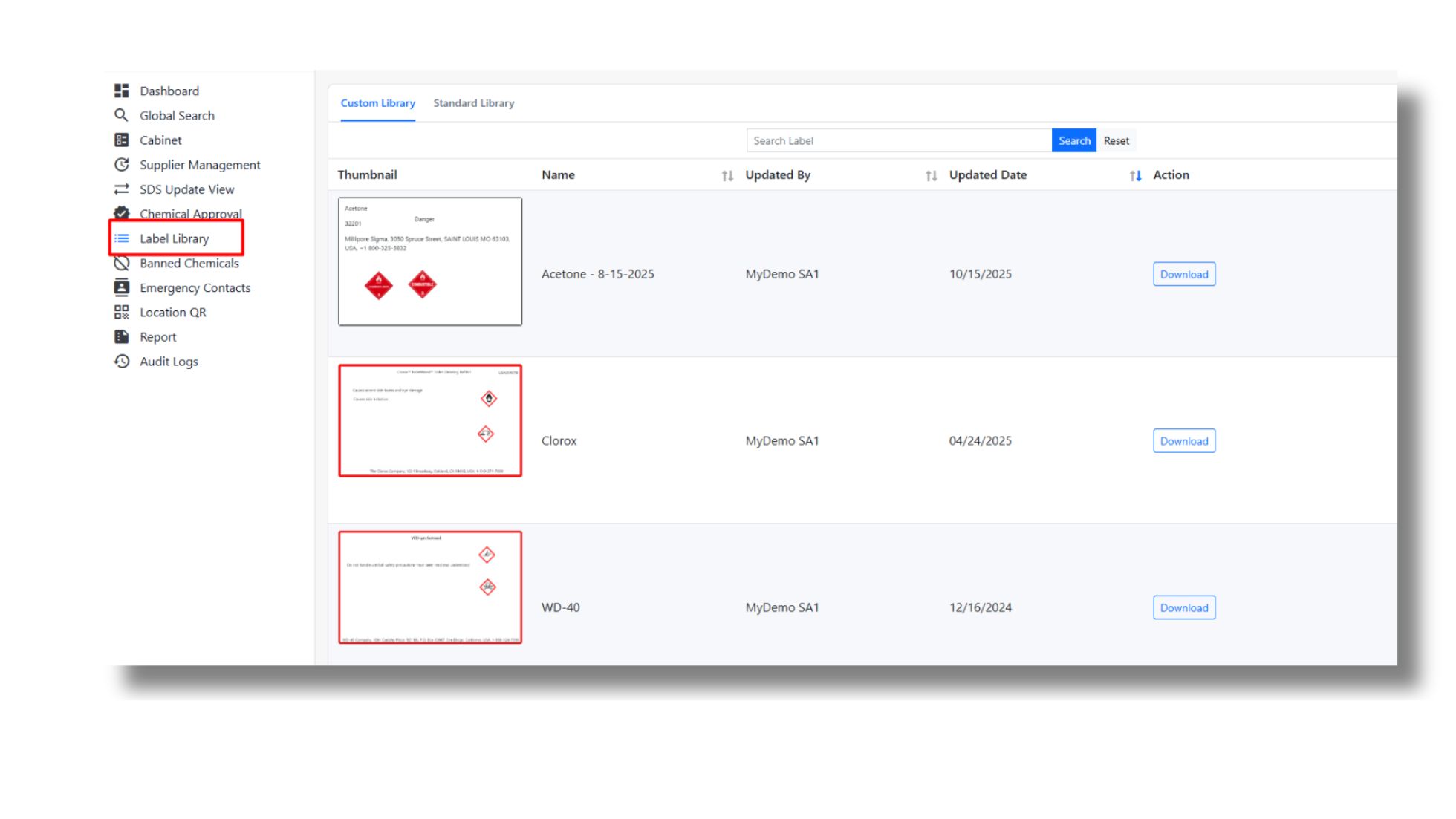
Sorting chemicals and making labels by hand could take a long time and be simple to mess up. That's why this SDS management software makes the process of label creation simple and hassle-free. To begin the process, the users only have to remember the name of the product and proceed. Users won't have to create the same product again, as they can store them safely.
Why it matters:
- Allows generating compliance-ready labels which are easy to store
- No need to create similar labels repeatedly.
- Hazard identification and communication become more effective
- Reduce delays
4. Easy SDS updates
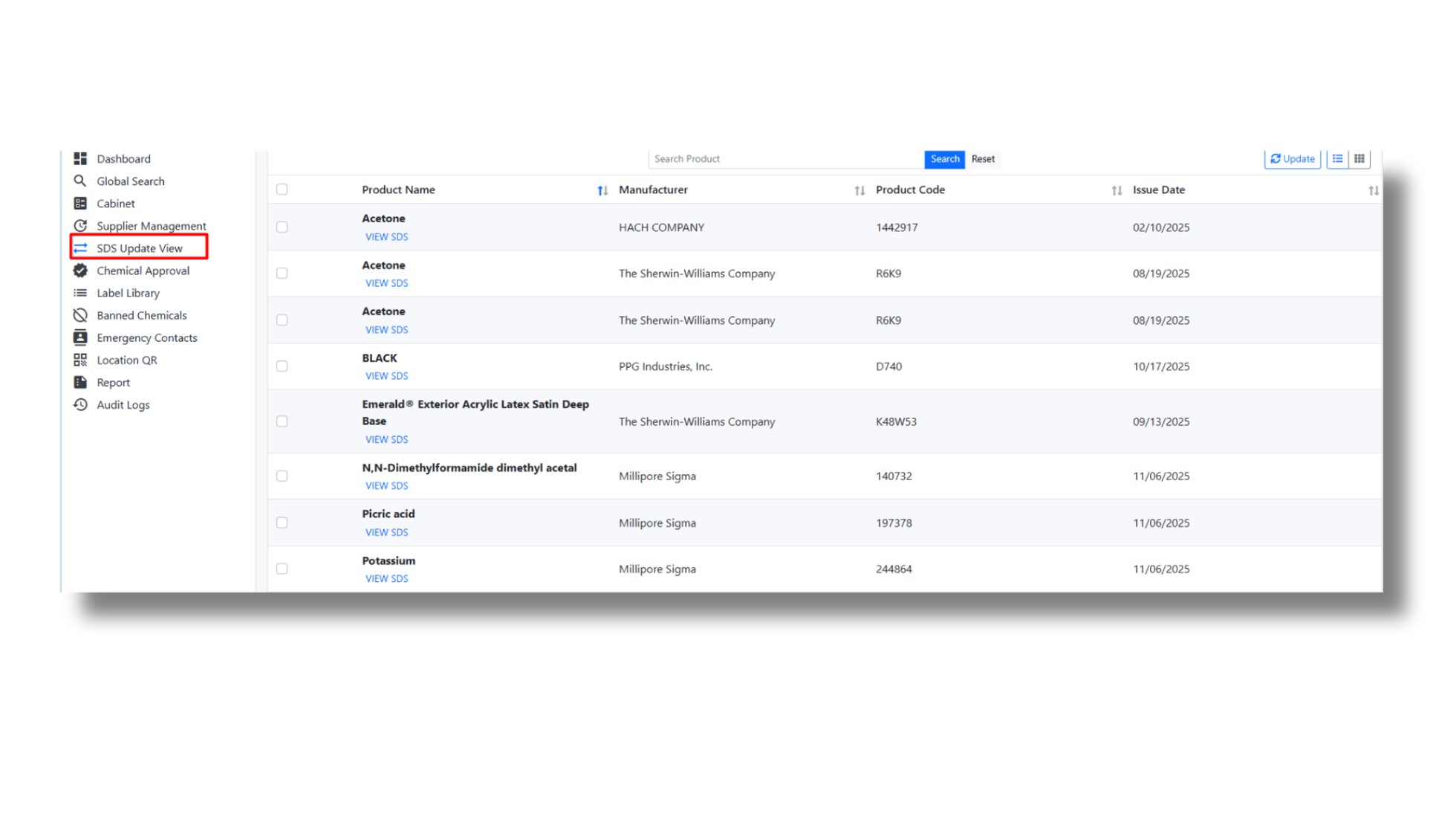
The SDS management software from CloudSDS is also built to introduce an uncomplicated update process for all SDSs in a systematic manner. Each document can be updated without much effort from reliable sources. Here's how it works:
-
Updates from reliable sources
Your team can send update requests to reliable sources like manufacturers or suppliers. Once the updated version is available, your team will receive a new document that is added to the database. Each of these SDSs is compliance-ready and authentic.
-
Send easy requests through emails
Send easy requests through emails or, if you prefer h time your team finds any required changes.
-
Update notification
Once any updated SDS version is added the users generally receive notifications or emails. Thus, users can stay alert and get access to authentic information always.
Why it matters
- Easy updates without putting manual labor
- Users only receive authentic information from reliable sources
- It streamlines the whole process of SDS update through a few clicks
5. Advanced reporting and audit readiness
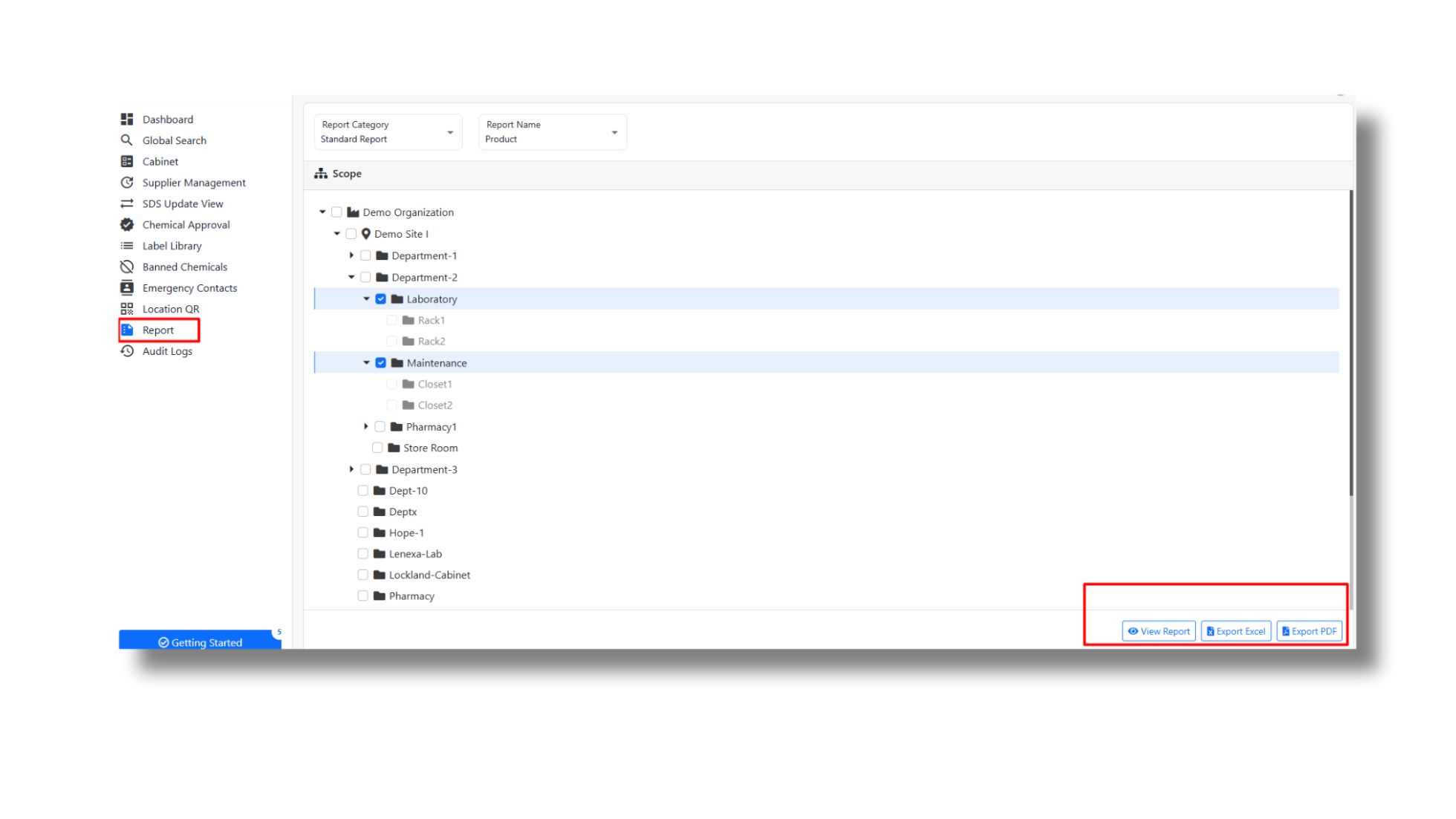
Getting ready for audits and keeping compliance records can be challenging, especially when the information is old or all over the place. CloudSDS makes this procedure simple by giving you organized documentation and effective reporting methods. It ensures that your business is always audit-ready and that you can find the right records when needed.
-
Compliance reports with one click
You may produce compliance reports using CloudSDS with only one click. You don't have to do anything manually since the system collects the information you need and shares it with you in a way that makes sense. This saves time, reduces chances of mistakes, and makes it easy to prove that you're following the guidelines when inspections happen.
-
Audit logs
The SDS management software from CloudSDS keeps activities related to your SDS documents tracked and recorded. You can see who looked at, updated, or added to a document along with the time. These audit logs make everything explicit and responsible, which makes it easier to detect changes and follow the regulations.
-
Always inspection-ready
CloudSDS keeps your SDS files organized and current, so you're always ready for inspections. You may provide the right papers instantly, whether it's a planned audit or a regular inspection. This makes an organization feel more secure and less likely to break the rules.
Why it matters:
- Quick access to reports and documents reduces last-minute stress and preparation time.
- Accurate and up-to-date records help avoid penalties, fines, and legal issues.
- Audit logs ensure clear visibility of all actions, building accountability across teams.
- Essential for industries managing high volumes of chemicals and complex compliance requirements.
6. Multi-user access and role-based permissions
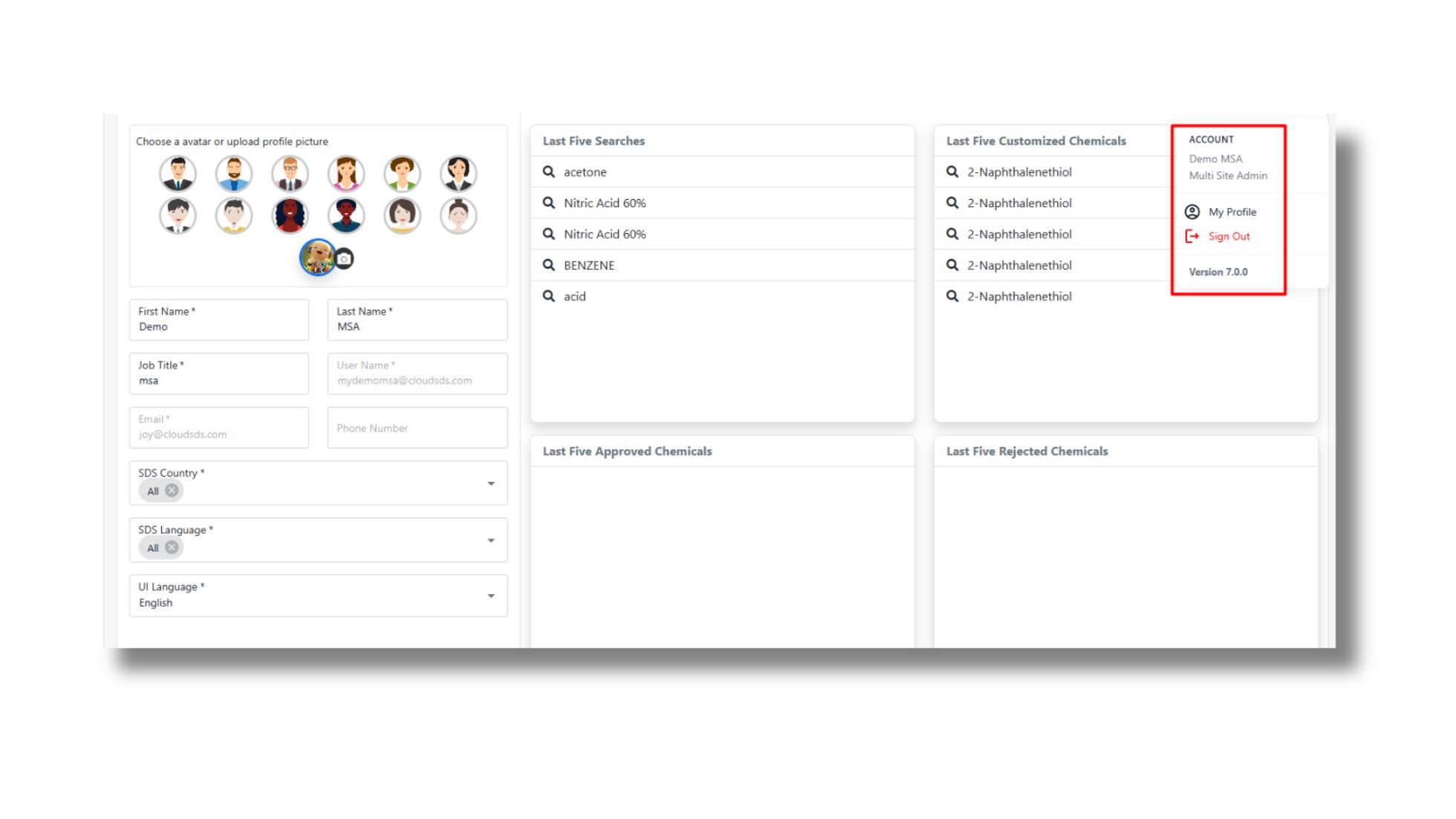
Not everyone should have the same level of access. With the SDS management software from CloudSDS it can be solved. Your team can offer multi-user access with role-based permissions.
-
Admin / Employee / Safety Officer Roles
Based on roles, let your team managers provide specific permissions. For example, admins can manage the entire system. Additionally, safety officers can monitor compliance and update SDS data. The goal is mainly building systematic access that allows your organization to create a proper collaboration while maintaining clear responsibilities.
-
Controlled Access to Sensitive Data
Only selected or assigned users will access what they are supposed to use or know. Thus, you can control who can view, edit, or share SDS documents and related data. Thus, you can also protect your information from unauthorized usage. Also, reduce the risk of accidental changes or data misuse.
Why it matters
- Only the right people can view or edit sensitive SDS data, improving data security.
- You can limit the editing rights and prevent accidental changes to critical safety information.
- Clearly defined roles make it easy to track who is responsible for specific actions.
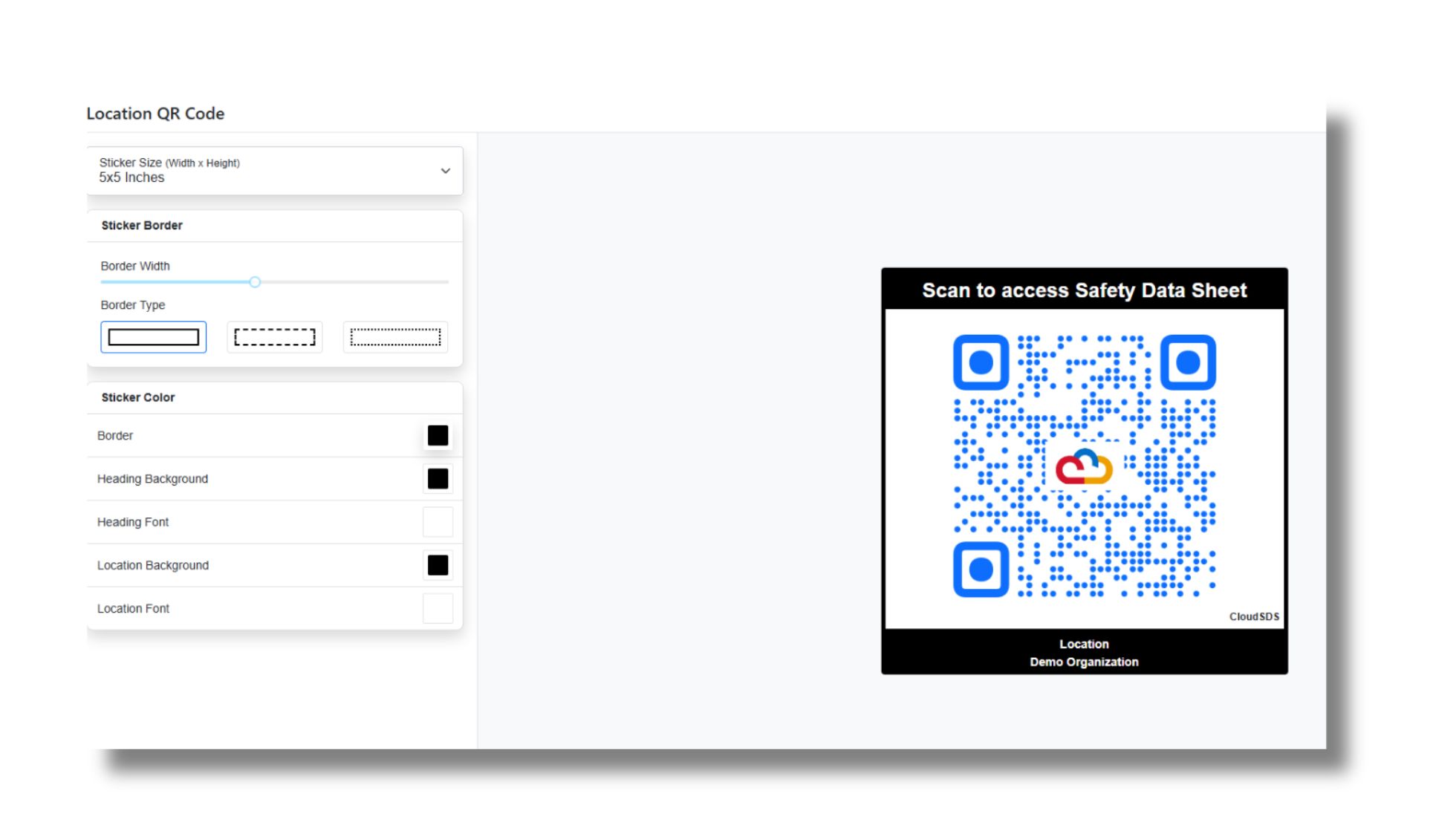
7. Access to emergency contacts
This software is not just about providing hazard information. Rather it's an appropriate tool for effective hazard communication. Here's why:
-
Get emergency contact details:
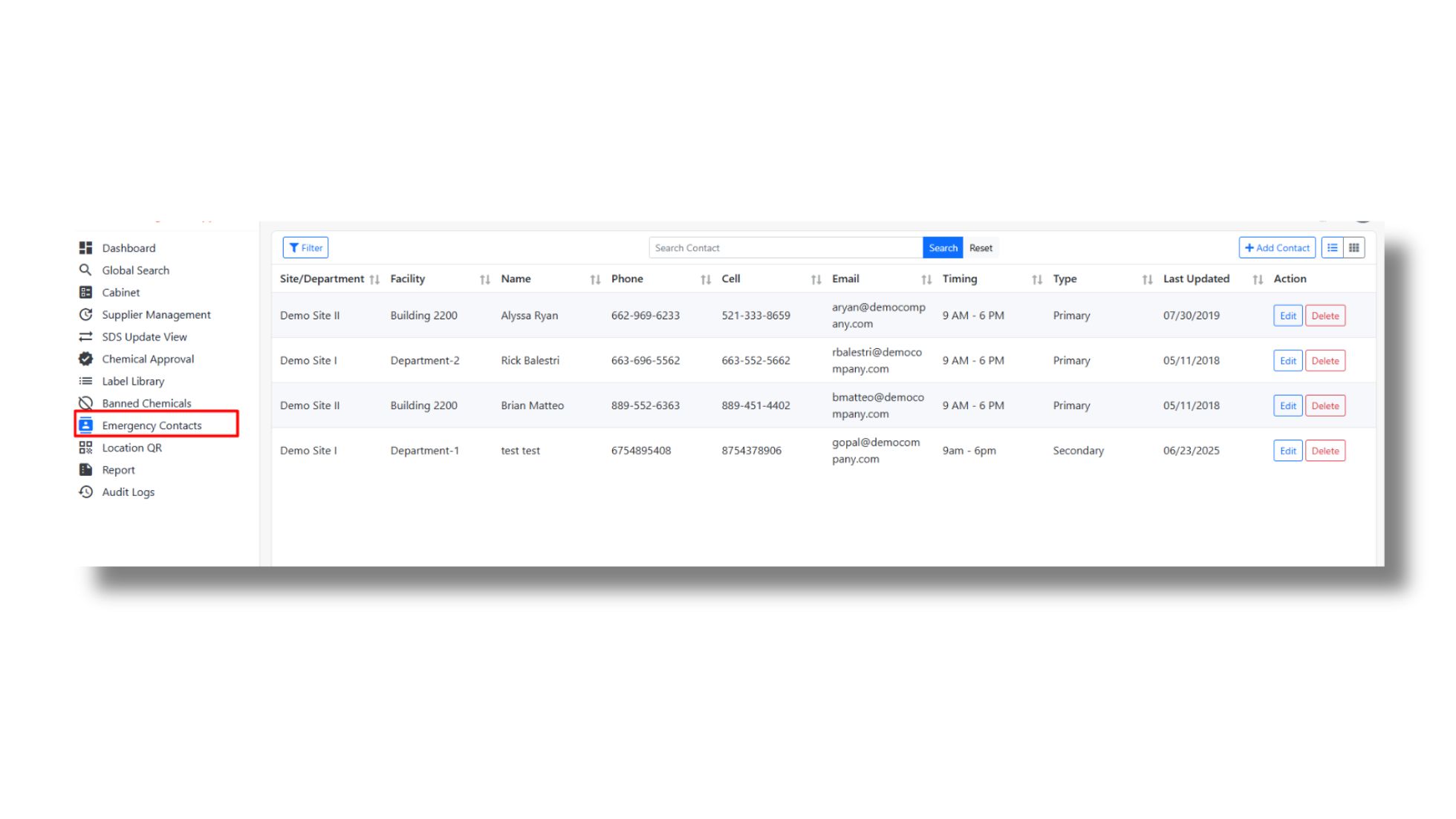
To handle emergencies, getting faster access to the right help is necessary. This software comes with a section that provides the right guidance when it is necessary. Thus, seeking and arranging necessary help becomes possible without wasting time.
-
Location-specific information:
Even if your organization has multiple facilities, providing the required help won't be impossible with this software. Users can access a single point and find details of the contact they need to reach out to in an emergency.
Why it matters:
- Provides right guidance and help at the time of emergency
- Getting access to the appropriate contact details becomes possible to handle emergencies
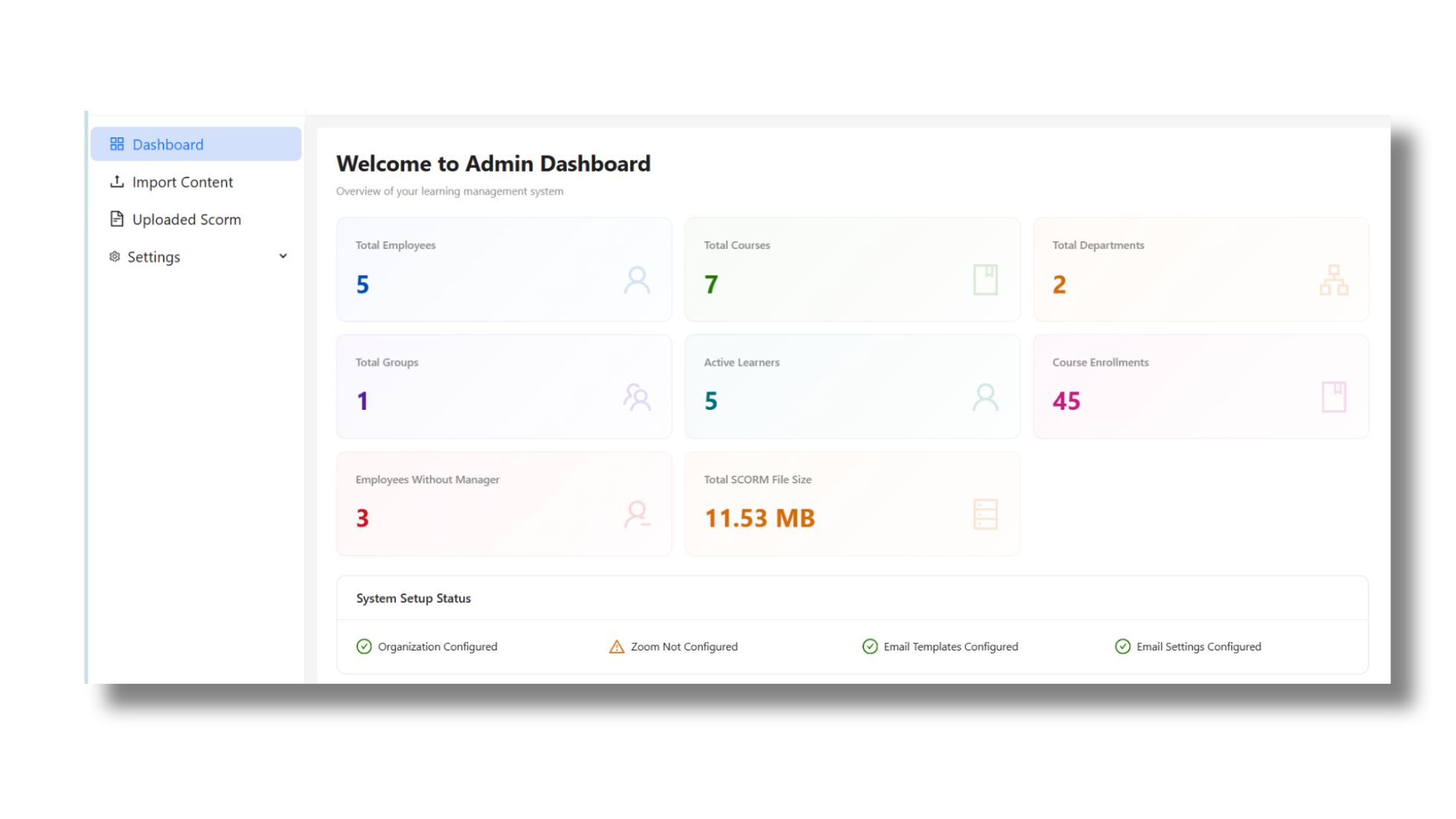
8. Safety training integration
CloudSDS is not just all about SDS management. It also allows your organization to provide appropriate training for chemical safety management during emergencies. Yes, your team can integrate the system with a learning management system (LMS).
-
Built-in LMS for employee training
Employees also must be trained, and CloudSDS is built to take care of it as well. So, your team can organize a simple and seamless process that allows each member to receive the training that OSHA mandates each employee to receive before their first assignment.
-
Track certifications and compliance.
This LMS is not just about providing the training, but it's also great for record keeping and showing results. It allows sharing a certificate at the end of each training session and also tracking the progress of each training session.
Why it matters
- Providing the right safety training along with conducting effective hazard communication
- Guide your employees while tracking the progress of each module
9. Hazard identification and communication
Conducting effective hazard communication is necessary to stay compliant. With this SDS management software, it's smoother. Here's why:
-
Get alerts for harmful chemicals
Your organization can restrict the entry of certain products that have nter any of those products that have already been banned.
-
No more incompatible materials together:
Keeping two incompatible materials side by side can lead to accidents. This system sends alerts in case your team members try to store any such materials together. Thus, your organization can escape accidents smartly.
Why it matters:
- Conduct hazard communication effectively
- Easily avoid chemical accidents by banning the entry of harmful products
- Get notification and alerts for improperly storing chemical products
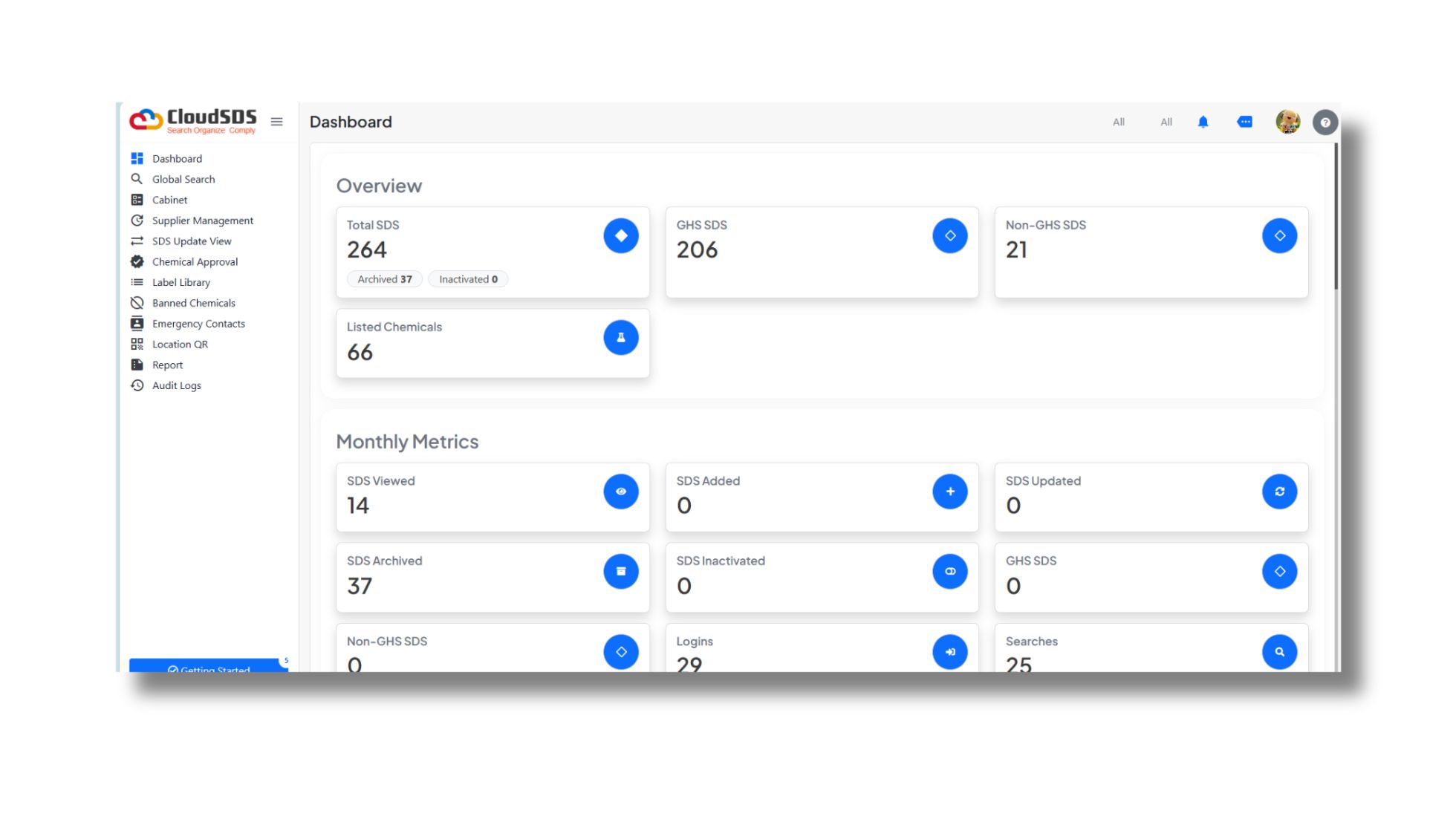
10. Cloud-based access
Accessing SDS data from multiple systems or locations significantly simplifies its management. CloudSDS lets organizations access SDS documents from the cloud, which means they can safely store and get to them from anywhere.
-
Access it from anywhere
CloudSDS lets users access SDSs from anywhere. Whether an employee is trying to retrieve a document from , the warehouse, home, or while moving, getting access to the right documents won't take hours. After all, this cloud-based system provides 24/7 assistance irrespective of the user's location.
-
No need to install
You don't have to install or keep up with software on each system because CloudSDS runs in the cloud. Thus, you can get rid of complicated setups and ensure that users always have access to the most recent version of the platform. It also makes it easy and quick to add new users.
Why it matters
- Employees can access critical safety data anytime, from anywhere, improving efficiency and response time.
- Easily adapts to growing teams, multiple locations, and increasing data without disruption.
Conclusion
The SDS management software from CloudSDS is designed to simplify chemical safety management and compliance-related issues. Each of its features is minutely built to improve safety management efforts. If you are searching for a solution, begin your journey with CloudSDS and see the difference.
Simplify Your SDS Management
CloudSDS gives your team instant access to 23M+ safety data sheets with AI-powered search, automated updates, and full OSHA/GHS compliance — all from one platform.
Leave A Comment