

Finding a reliable source of all the SDSs that anyone may require can be very difficult. After all, an updated SDS database is always an expensive tool. But that's not reality. An updated and reliable SDS does require maintenance, but some organizations do offer free access to their precious database, which is always verified by experts.
Yes, some helpful and unrestricted SDS databases do exist, which are accessible online. Just like any subscribed SDS database, these too can be accessed anytime and also from anywhere. The users won't always have to register to get access to it. All they have to do is go to the website, write the product name, and hit the search menu, and it's there.
All those who need SDSs daily must find access to all the reliable resources that are available easily. But how to get there? Well, continue reading this list as it contains all the details your organization may require to ensure ultimate safety for its employees.
Where To Find Free SDS Online: Best Unrestricted Databases
Organizations handling chemical products daily need access to a database that is not just free but comes with no restrictions for the users. These types of tools allow companies, laboratories, schools, and employees to quickly search for chemical safety information without paying subscription fees. What makes these databases useful is its search friendliness. Users can search by chemical name, product name, CAS number, or manufacturer to find a desired SDS. Free SDS databases are especially helpful during emergencies.
Not all available options are reliable as staying updated is a challenge for many organizations. Naturally, some websites may contain outdated documents, missing sections, or region-specific SDS versions that do not match local compliance requirements. However, a solution like the SDS management software from CloudSDS is always a great option to count on. This type of reliable source helps connect users with a dadatabase,hich is maintained with the help of authentic resources like the real manufacturer of chemicals.
What is an SDS database?
1. Definition of SDS database
An SDS database is a system that helps primarily to store and organize safety data sheets (SDSs) that an organization or anyone handling chemical products requires daily. An advanced SDS database simplifies the process of searching the documents and the retrieval of important chemical safety information. Such a database can be handled both manually and digitally. Organizations use paper binders or folders to manage the documents. On the other hand, a digital SDS database can be managed through smart devices. Many organizations also refer to it as an online SDS library, MSDS database, or digital safety document system because it helps users perform fast SDS lookup whenever chemical information is needed.
2. Centralized chemical safety document repository
Chemical Safety Database All your organization's SDS documentation in one secure, centralized location. This gives employees, safety managers, auditors, and emergency responders easy access to precise chemical safety information when needed. The faster SDS lookup approach is a great relief for users to quickly discover the documents they need. This way they can avoid going through multiple folders to discover a required file. Centralization is necessary. It helps an organization avoid all the increased risks related to non-compliance.
3. Difference Between SDS Repository and SDS Management Software
SDS repository
- Mostly used for storage and organization of SDSs
- Provides an online library of SDS or digital archives
- Provides basic SDS lookup and document downloads
- Mainly includes simple searching methods along with filtering
- Manual updates and maintenance of all the documents necessary here
- Does not come with advanced compliance tracking features
- Ideal for small enterprises if minimal chemical inventory is required
SDS management software
- Full chemical safety management and SDS storage provided
- Serves as a consolidated digital safety document system
- Offers features to conduct smart SDS look up faster
- Updates all SDSs systematically
- Helps monitor chemical inventory and hazardous chemicals
- Support management of OSHA HazCom and GHS compliance
- Provides user access controls, notifications and audit reports
- Ideal for enterprises with large or multi-site chemical inventories
- It connects SDS management to the larger EHS and safety workflows.
.
4. Relation to OSHA's HazCom standard
OSHA's Hazard Communication Standard (HazCom) makes it compulsory for organizations to have Safety Data Sheets (SDSs) for all the hazardous substances used in the workplace. According to the HazCom standard, it's necessary to make the SDSs easily accessible to all. Companies can meet this need with an SDS database that provides people with immediate access to chemical safety information during routine operations or in a crisis. It's important to know that all the SDSs must align with the Globally Harmonized System (GHS).
A centralized MSDS database also facilitates compliance with regulations during OSHA inspections and safety audits. It's easy for employers to demonstrate that staff have current SDS documentation and the appropriate hazard information. A digital SDS search system removes the risk of lost, out-of-date, or unavailable safety papers, which can lead to compliance violations or accidents in the workplace.
5. Manufacturer-hosted vsthird-party databases
Manufacturer hosted database
- Managed directly by chemical producers or vendors
- Usually contain the most accurate and latest SDS documents for their own products
- Users can search SDSs by product name, product code or chemical identifier
- Assists in obtaining precise compliance data from manufacturer
- It can be tough to maintain when purchasing chemicals from several providers, as documentation are housed on different websites
Third party SDS databases
- Centralize multiple manufacturers' SDS documentation into one platform
- Provide a single online SDS library for easier management of chemical safety
- Allow enterprises to rapidly find, organize and access SDSs from multiple vendors
- Make it easier for employees, safety teams and compliance management
- Companies should keep confirming that SDS documentation are up-to-date and compliant with OSHA and GHS standards
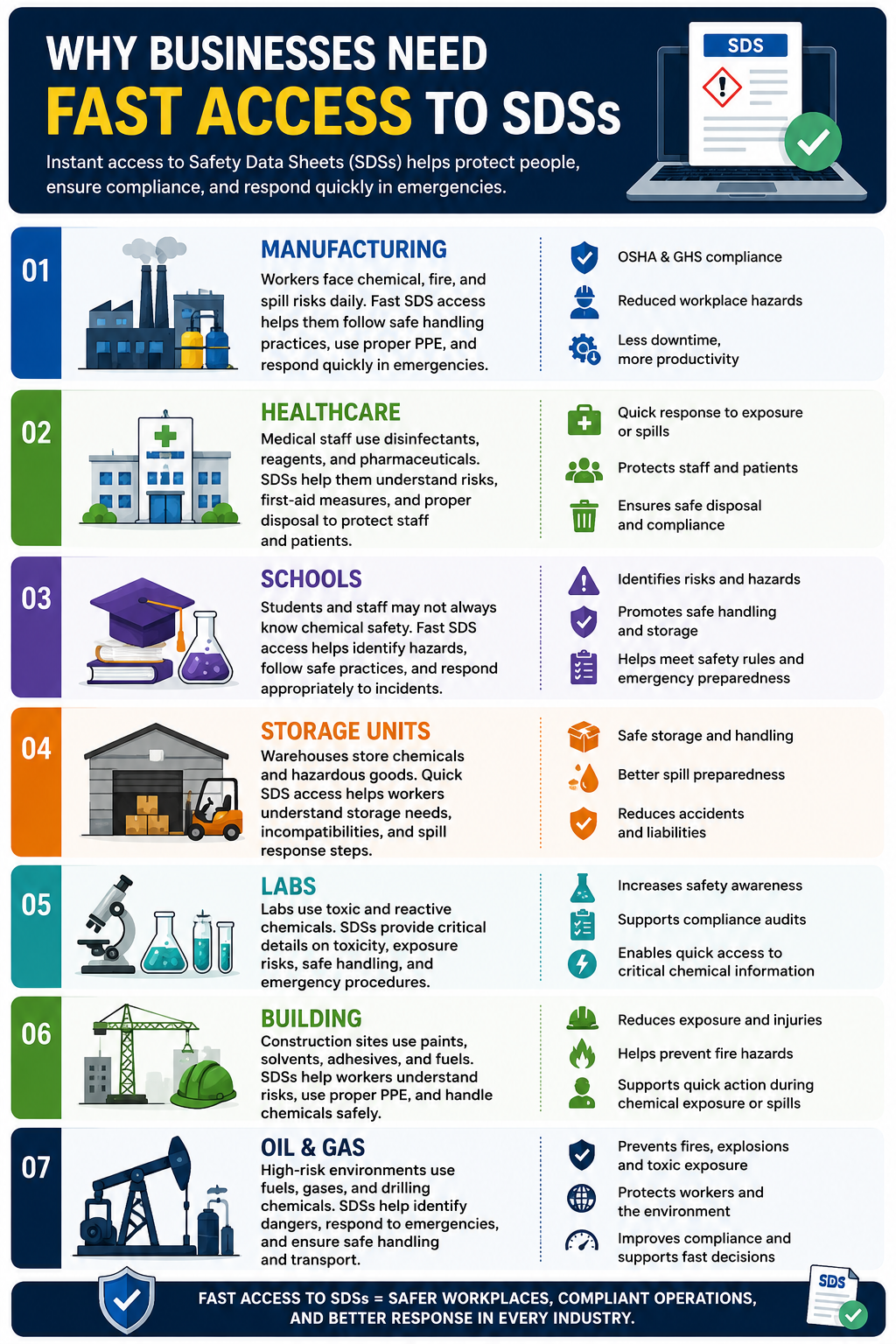
Why businesses need fast access to SDSs
1. Manufacturing
Every day manufacturing facilities manage significant amounts of chemicals, solvents, lubricants, coatings, and industrial materials. Workers may be exposed to chemicals, fire hazards, hazardous odors, or unintentional spills. Quick access to Safety Data Sheets (SDSs) enables employees to quickly learn safe handling practices, necessary personal protective equipment (PPE), storage rules, and emergency response processes. Instant SDS access when there’s an inspection or emergency also helps manufacturers stay OSHA and GHS compliant and reduce workplace hazards and production downtime.
2. Healthcare
Hospitals, clinics, and healthcare laboratories routinely utilize disinfectants, sterilizing chemicals, laboratory reagents, and pharmaceutical compounds. Medical personnel need immediate access to SDSs in order to learn about chemical risks, first-aid procedures, and proper disposal methods. In emergencies such as accidental exposure or chemical spills, having access to SDS can enable healthcare employees to respond more quickly and protect staff and patients alike.
3. Schools
Chemicals are kept in research labs, maintenance departments, and cleaning supply sections in schools, colleges, and universities. Fast SDS access is even more relevant in the case of teachers, lab assistants, and students who don’t always have sophisticated knowledge of chemical safety. Having ready access to SDS documentation enables educational institutions to identify dangers, implement safe handling methods, and respond appropriately during incidents such as spills or unintentional exposure. It also helps schools meet safety rules and be better prepared for emergencies.
4. Storage units
Warehouses are typically used for the storage of huge quantities of chemicals, cleaning products, paints, batteries, and dangerous goods. Workers who receive, handle, and ship items must be able to access SDSs immediately to understand storage requirements, incompatibility risks, and spill response procedures. In an emergency, such as a leak, fire, or accident during transit, quick access to an SDS is even more crucial.
5. Labs
Labs utilize many dangerous compounds in their testing, research, and experimentation. Researchers and lab technicians need access to SDSs to determine the toxicity, exposure risks, safe handling practices, and emergency procedures. Laboratories often deal with very reactive or toxic materials; therefore, a delay in accessing safety information is a risk factor in mishaps. Digital SDS solutions enable labs to increase safety awareness, clear compliance audits, and ensure researchers can access key chemical information promptly when needed.
6. Building
Construction sites make use of chemicals such as adhesives, paints, solvents, fuels, sealants, and concrete additives. Workers are frequently exposed to hazardous substances in shifting, fast-paced workplaces. Easy access to SDSs helps construction crews better grasp fire hazards, respiratory risks, adequate PPE requirements, and safe chemical handling practices. SDSs make it possible for workers and emergency responders to act quickly to reduce injury and environmental hazards when there is a chemical exposure or spill.
7. Oil and gas
The industry's use of highly hazardous substances such as fuels, chemicals used in drilling, gases, and industrial lubricants. Workers are employed in high-risk areas where chemical mishaps can result in fire, explosion, toxic exposure, or environmental harm. It is important to be able to quickly obtain SDSs to identify dangers, respond to emergencies, and safely store and transport chemicals. Oil and gas firms can use digital SDS management systems to increase worker safety, stay compliant with regulations, and get fast decision-making support during emergencies.
What makes an SDS database "unrestricted"?
1. No registration needed
One of the main benefits of an unlimited SDS database is that users don't need to sign up and fill out long registration forms to be able to find content. In an emergency, employees may not have time to sign up or wait for permission. Open access means workers may get chemical safety information, first-aid instructions, and hazard information right away, any time they need it.
2. Unlimited search ability
An unconstrained SDS database must enable users to search for thousands of chemical goods and manufacturers limitlessly. This allows enterprises to find SDSs fast and without the daily search limits or usage quotas. Unlimited access might be especially beneficial for firms with a big inventory of chemicals in several departments or sites.
3. No paywall
Many organizations want SDS solutions that do not lock documents behind subscriptions or paywalls. SDSs are important safety documentation in the workplace. An open SDS database is a fully open database that allows free access to important chemical safety information. Removing paywalls allows employees, suppliers, and emergency responders to access hazard information without delay.
4. Access to free PDFdownload
A public SDS repository should allow users to obtain free SDS PDF files straight from the platform. PDF access is vital since firms could need to store SDSs electronically, print copies to give to work areas, or exchange documents with employees and contractors. You also can download the PDF for free so you can access it offline when inspecting in an emergency without internet.
5. Open manufacturer access
An unconstrained platform typically combines SDS documentation from several manufacturers, rather than tying consumers to the products of a single source. This establishes a consolidated and open SDS library where companies may access chemical safety information from several manufacturers at one site. Open manufacturer access translates to more convenience and less time searching different sites.
6. No subscription walls
Some SDS databases limit functionality to those who have premium plans or annual memberships. Free user access to critical chemical safety documentation is provided by unconstrained SDS systems by removing or lowering subscription barriers. This is especially useful for small firms, schools, labs, and organizations with low compliance budgets.
Restricted vs unrestricted SDS access
| Restricted SDS access | Unrestricted SDS access |
| User registration necessary | Registration not mandatory. |
| Limited daily searches | Unlimited search capability |
| Subscription fees included | No paywall or hidden charges |
| Downloads may be restricted | Downloadable PDF SDSs |
| Access may be limited to one manufacturer | Open manufacturer access |
| Premium plans required for full functionality | No subscription barriers |
| Slower access during emergencies | Faster access to critical safety information |
Are free SDS databases reliable?
1. Some databases combine old SDSs.
Many free SDS database download documents from various web sources and store them in one central repository. However, the records may not be routinely updated by some platforms when manufacturers issue changed versions of the SDS. It's obvious that users have been relying on databases that contain outdated information. Using obsolete SDSs might increase safety risks in the workplace and create compliance concerns during audits or inspections.
2. Revision-date issues
One of the most crucial features in an SDS is the revision date because it tells you when the document was last modified. Some free databases may show previous versions while the manufacturer provides recent updates. As hazard categories, chemical compositions, and regulations may change over time, it is the responsibility of the business to always confirm that the latest revision date is being used before distributing SDSs with employees.
3. Manufacturer mismatch
Sometimes consumers download an SDS for a different manufacturer with a similar product name. Two items may seem alike, but their chemical makeup, hazard categorization, and handling instructions may be different. Disparities between manufacturers can lead to wrong safety practices and compliance problems.
4. Regional regulatory variations
Chemical restrictions differ by country and location. That's why companies operating globally must verify all their SDSs and their regulatory requirements location-wise.
5. Missing section 16 amendments
Section 16 sometimes contains key revision details, preparation dates, and other regulatory information for an SDS. Some free SDS datasets may have partial or older versions, where section 16 has not been fully updated. The absence of revision history might create issues for organizations to check if the SDS reflects the most recent regulatory or manufacturer updates. This can lead to confusion during compliance assessments and safety inspections.
Checklist for SDS reliability
- Manufacturer verification: Check if the SDS was received from the actual manufacturer of the chemical product.
- Revision date: Check the date when the SDS was revisioned or updated.
- GHS format: Make sure that the SDS includes 16 sections to align with the GHS format.
- OSHA compliance: Ensure the SDS meets OSHA Hazard Communication guidelines and local laws.
- Language availability: Ensure that the SDS is available in the appropriate language for employees and workplace locations.
| SDS Database | Best For | Key Strengths | Main Limitation | Industries Covered |
|---|---|---|---|---|
| Sigma-Aldrich | Research laboratories & biotech | Highly accurate manufacturer-issued SDSs | Limited mostly to Sigma-Aldrich products | Laboratories, Pharmaceuticals, Biotechnology |
| Fisher Scientific | Healthcare labs & research facilities | Reliable SDS accuracy and easy access | Mainly focused on Fisher products | Healthcare, Education, Pharmaceuticals |
| CloudSDS | Centralized SDS management for organizations | Quick SDS retrieval and hazard communication support | Advanced workflows may require customization | Manufacturing, Healthcare, Warehousing |
| Dow | Industrial manufacturing operations | Strong compliance and industrial chemical documentation | Product-specific database only | Manufacturing, Construction, Industrial Processing |
| BASF | Chemical manufacturing supply chains | Global regulatory support and industrial SDS coverage | Mostly BASF-specific products | Manufacturing, Agriculture, Automotive |
| 3M | Construction & facility maintenance | Easy product search with reliable manufacturer data | Limited to 3M products | Construction, Manufacturing, Healthcare |
| Univar Solutions | Chemical distribution management | Broad chemical catalog with multi-product access | Supplier-focused platform | Manufacturing, Oil & Gas, Food Processing |
| VelocityEHS | Enterprise SDS compliance management | Centralized repository with compliance tracking | Some advanced features require paid access | Manufacturing, Healthcare, Logistics |
| SDSmanager | Small and medium-sized businesses | Compliance-focused SDS organization tools | Smaller database coverage | Manufacturing, Warehousing, Laboratories |
How to search for an SDS properly
1. Search byproduct name.
The most popular way to search SDSs is by product name on the chemical bottle or container. Most SDS databases and manufacturer sites allow users to type a product name directly into the search field. This is an easy and quick way, especially if the employee understands merely the name of the commercial product.
But product-name searches might be tricky due to inconsistent naming. Some items are sold under brand names that do not represent the actual chemical composition. In such a case, the provider-specific product name may be different for different providers, even if the content is similar. For example, cleaning agents. Naming difficulties might affect search accuracy at the regional level. One substance can have several different names in different countries and areas.
For best results, the user should provide the exact name of the product as it appears on its label. Therefore, at the time of search users must provide additional details like manufacturer name, CAS no., etc.
2. Search for a CAS number.
The most reliable way to locate an SDS is to search by CAS number. CAS number (Chemical Abstracts Service Number) is a unique number for a particular chemical compound. Unlike product names, CAS numbers are global, not associated with any manufacturer, language or location.
CAS numbers provide for more exact searching by eliminating misunderstandings that may arise from different product names, synonyms, or trademarked branding. Even if the same chemical is sold under multiple names by several businesses, the chemical substance is always the same and has the same CAS number.
The CAS number search is highly beneficial in labs, manufacturing facilities, healthcare facilities, and regulatory compliance processes where accuracy is vital. Most unrestricted SDS databases and manufacturer websites allow direct searches by CAS number to increase document correctness.
3. Search by manufacturer
You can also look up an SDS on the chemical manufacturer's website or directly on an SDS portal. Many manufacturers also provide searchable libraries of SDS by product name, catalog number, or chemical identity.
Manufacturer searches are typically useful as you get the most updated, fully authorized SDS versions. But brand hierarchy problems could be a little of bother to customers. Large corporations have many different chemical names and divisions; thus, it can be difficult to know who actually made the SDS.
Subsidiary firms can be complicated and a headache too. The label of a chemical product may have one distributor, but the SDS itself is housed in the main business computer. In these cases, consumers may need to search both distributor and parent manufacturer portals to find the right document.
In general, including manufacturer information in product names greatly improves the accuracy of SDS searches.
4. Search by synonyms
Many chemicals have multiple synonyms, scientific names, acronyms, or alternate spellings. If you do not know the proper name of the commercial product, or the ingredients have different names in other businesses or locations, you can attempt synonyms.
Chemical aliases are fairly widespread in industrial and scientific settings. For example, isopropyl alcohol can be called IPA, 2-propanol, or isopropanol. Some workplaces may refer to sodium bicarbonate as baking soda.
Alternative spellings can also impact searches within the SDS, notably between American and British English versions. Scientific names are particularly significant in the laboratory and in health care organizations. Chemicals are usually known by their technical rather than by their proprietary names.
It enhances the likelihood of identifying the relevant file fast, especially in huge open SDS repositories and free SDS databases, if several synonyms are used to perform the search for SDS.
Free SDS databases vs SDS management software
Free SDS databases are wonderful tools for quick searches and downloads of Safety Data Sheets. For small-sized businesses, this is a great support. But bigger firms need access to more features. After all, they handle multiple products and locations. But they can easily manage all duties related to chemical safety management.
Choosing an SDS management software is not just all about handling the SDSs. An advanced one is more than that. It makes it easier for enterprises to manage SDSs centrally, automate changes, improve employee access, track chemical inventories, and support OSHA Hazard Communication compliance.
Below is a comparison between free SDS databases and dedicated SDS management software.
| Feature | Free databases | SDS management software |
| Search access | Yes | Yes |
| Auto updates | Limited manual verification | Yes |
| Inventory tracking | No | Yes |
| Employee access control | No | Yes |
| Audit reporting | No | Yes |
| Multi site management | No | Yes |
1. Search access
All users can begin their search for SDSs using free SDS databases or SDS management solutions. Free databases are good for basic SDS retrieval, but SDS software provides more comprehensive search possibilities, centralized storage, and speedier document handling for large chemical inventories.
2. Automatic updates
Not all free SDS databases always contain updated documents always. As a result, organizations may need to examine the update date closely. However, advanced SDS management software helps with an automatic and more streamlined SDS update process. Thus, maintaining an updated SDS database becomes easier.
3. Inventory control
Free databases usually only offer access to SDS and do not have chemical inventory management functionality. SDS software lets companies track how many chemicals they have, where they are stored, expiration dates, and hazardous material inventories at different locations.
4. Access control of employees
Most free SDS repositories don't permit role-based employee permissions. The SDS management software also helps organizations to control who can upload, change, maintain, and access SDS documents, thus improving security and compliance management.
5. Audit report
Firms may be required to produce reports on SDS availability, revision history, and personnel access records in the event of OSHA or internal compliance audits. Most free databases lack reporting capabilities, but SDS software can quickly produce audit-ready compliance reports.
5. Multi-site management
For firms with multiple sites, the manual handling of SDSs from free sources is challenging. SDS management software provides a centralized system for chemical safety information on all sites, easing compliance and making it available to staff across the organization.
When businesses should upgrade to SDS management software
1. Multiple facilities
It may be difficult for multi-site organizations to maintain regular access and meet SDS standards. Without the help of a centralized system, it becomes difficult to manage all the SDSs across multiple locations. With this software, you can keep all your documents in one place, and employees in different locations may immediately access current safety information.
2. Compliance examination
Compliance checks become more difficult when SDSs are manually stored in binders, spreadsheets, shared drives, or disconnected systems. Auditors may request to see evidence that the most recent SDSs are ready to be accessed, the revision history, who has accessed the SDSs, and how hazards are communicated. SDS management software allows enterprises to organize paperwork, automate updates, and generate audit-ready reports fast, helping organizations prepare for OSHA and regulatory inspections.
3. Big stakes
As chemical inventories grow, the manual tracking of SDS paperwork can be both time-consuming and mistake-prone. Large inventories increase the risk of storing duplicate chemicals, expired products, faulty SDSs, and incorrect inventory records. With SDS management software, firms can handle chemicals efficiently, increase visibility of inventory, and retain up-to-date safety documents for all hazardous substances in all departments or facilities.
4. Employee training requirements
Chemical safety and hazard communication training are usually required on a regular basis for organizations that have a big number of employees or high employee turnover. Employees must have immediate access to SDSs and knowledge of chemical hazards to which they are exposed during their work. SDS management software may help collect the documents, make sure workers are reading the most updated SDSs, and allow users to communicate hazard information throughout the organization, all of which can help with employee training.
5. Chemical approval procedures
There are a variety of industries in which new chemicals can be introduced in the workplace. Manual review processes can result in delays, non-uniformity of reviews, and compliance challenges. SDS management software speeds up the chemical approval procedure. Safety teams may identify hazards, check compliance requirements, evaluate risks, and approve chemicals all in one digital system.
Conclusion
With the increase of the size of the companies, chemical safety management is increasingly difficult and demanding to control manually. Migrating to SDS management software allows organizations to improve their operational efficiency, enhance their hazard communication programs, reduce compliance risks, and offer personnel with faster access to accurate chemical safety information. So, understand your company's requirements and decide the right fit for it to stay compliant always.
FAQs
1. Are Isfree SDS databases OSHA-compliant?
There are some free SDS databases out there that might help you with OSHA compliance. They provide access to the SDS (Safety Data Sheets) in the specified GHS format. But OSHA compliance also depends on having SDSs that are up-to-date, accurate, and accessible to workers where they work. For compliance purposes, companies should always check the revision dates and manufacturer information before using free SDS databases.
2. Where can I get free SDS PDFs?
Yes, many SDS databases and corporate websites make free SDS PDFs available for clients to download. PDF enables firms proper access to save, print and exchange chemical safety documentation more efficiently. However, some other sites may limit downloads or ask for registration for premium access.
3. What is the best engine to use for an SDS search?
The perfect SDS search engine will be based on your organization's needs, industry, and regulatory requirements. Manufacturer websites are usually the greatest source for the most accurate SDSs for their products. Centralized SDS databases allow easy searching across various vendors. If your organization handles large volumes of chemicals, you may want specific SDS management software with advanced search and tracking capabilities.
4. Can I look for SDSs by CAS number?
Yes, the best approach to search for an SDS is by searching by CAS number. CAS Registry Numbers are unique identifiers for chemical substances that remove the confusion of product names, synonyms, or branding modifications. Several SDS databases and manufacturer portals offer direct CAS number searches.
5. How do I know whether an SDS has expired?
Look for the SDS revision or update date to determine if an SDS is current. This date is normally included in Section 16 of the SDS. Or, you could compare the document to the latest one from the manufacturer to see if it matches. Old SDSs may contain outdated hazard classifications, incorrect PPE recommendations, or outdated regulatory information.
6. Are SDSs and MSDSs the same?
MSDS (Material Safety Data Sheet) and SDS (Safety Data Sheet) are similar, but SDS is the newer internationally recognized format established under the GHS. The SDSs are prepared in a common style of 16 sections to facilitate ease of understanding and accessibility of chemical safety information. In many locations the document is now called an SDS rather than an MSDS to align with OSHA HazCom requirements.
7. What if I can't find an SDS?
If you cannot identify an SDS, try to locate it by other ways such as product name, CAS number, manufacturer name, or chemical synonyms. You should also contact the chemical manufacturer, distributor, or supplier directly to ask for the document.
8. Are manufacturers legally obligated to provide SDSs?
Yes. Under OSHA Hazard Communication rules, chemical manufacturers and importers must provide SDSs for dangerous chemicals. The SDS must provide correct information on hazards, handling, storage, and emergency response. Employers also must have these records accessible to employees at the workplace.
9. Are SDSs in several languages?
Yes, many manufacturers have SDSs available in multiple languages to support their international operations and to meet regional regulatory requirements. The availability of language is especially crucial for international companies and workplaces with multi-lingual employees. Employers should make sure that employees can get SDSs in a language that they can easily understand.
10. Are SDSs accessible to employees on mobile devices?
Yes, many modern SDS databases and SDS management software packages include mobile access on smartphones, tablets, and cloud-based systems. Employees have real-time mobile access to chemical safety information in emergencies, inspections, or day-to-day operations. This promotes workplace safety by allowing access to SDSs at any time and from any place.

Simplify Your SDS Management
CloudSDS gives your team instant access to 23M+ safety data sheets with AI-powered search, automated updates, and full OSHA/GHS compliance — all from one platform.
Leave A Comment